The copier you know. Evolved.
Trade. Track. Review. Journal. Copilink Standalone is coming soon.
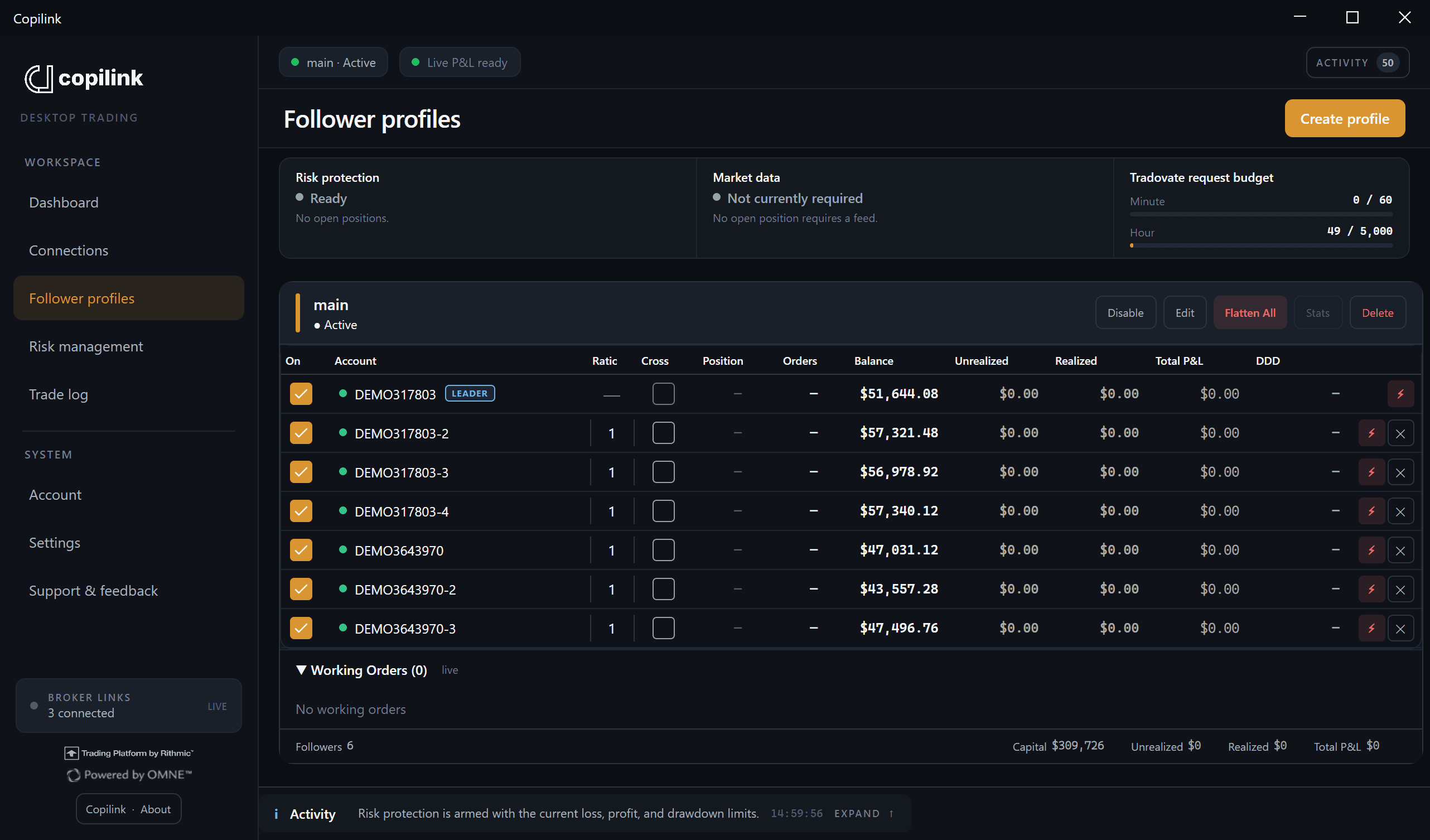
Why Copilink?
Copilink: Copilink is a trade copier for NinjaTrader 8 - built by a trader, for traders. Originally developed for my own trading needs, Copilink was born because I needed a reliable and usuable - something the market simply didn't offer. Until now.
How Copilink Works
Native NinjaTrader 8 Add-On:
Copilink integrates directly into NinjaTrader 8 for seamless, low-latency execution.
TradingView Integration:
Use TradingView for analysis and entries - Copilink handles the copying in the background.
Persistent Settings:
All your Copilink settings are automatically saved, so you can launch NinjaTrader and start trading immediately.
Advanced Risk Management
Daily Profit & Loss Limits
Set per-account daily profit targets and loss thresholds. Copilink auto-flattens and disables followers when limits are hit.
Intraday Trailing Drawdown Tracking
Real-time trailing drawdown monitoring similar to Apex and Topstep.
Independent Risk Profiles
Each follower has its own unique risk configuration fully persistent across sessions.
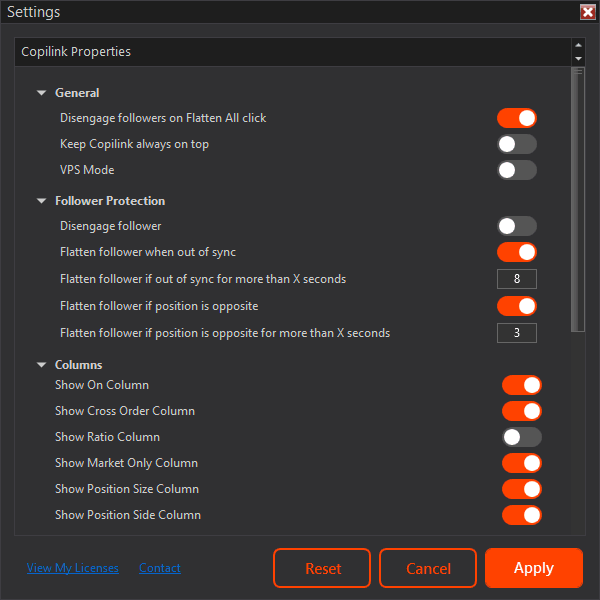
Follower Protection
Smart Sync Monitoring:
Copilink continuously checks if followers are out of sync and takes corrective action.
Auto Flatten on Desync:
If a follower drifts off from the leader, Copilink can flatten it after a specified interval.
Optional Safety Nets:
Built-in options like partial fill handling and emergency flatten.
Made for Prop Firms
Built for High-Capital Scaling:
Designed with prop firm traders in mind.
Prop Firm Risk Management
Risk management features specifically made for prop firm trading.
Live Accounts Support:
Not just for evals - Copilink works great for live trading or managing client funds.
Fastest Execution On The Market
1.6 ms Execution
Copilink blows every other trade copier out of the water - delivering ~1.6 ms average execution latency. View our methodology.
Copilink
Cloud Copeirs
Copilink Copying Features
Copilink mirrors trades from your master account across all followers instantly and reliably.
All user preferences in Copilink are saved automatically, letting you reopen NinjaTrader and start trading without reconfiguring.
Detects and corrects mismatched follower positions to prevent risk exposure.
Ensure execution in all conditions by forcing followers to use market orders.
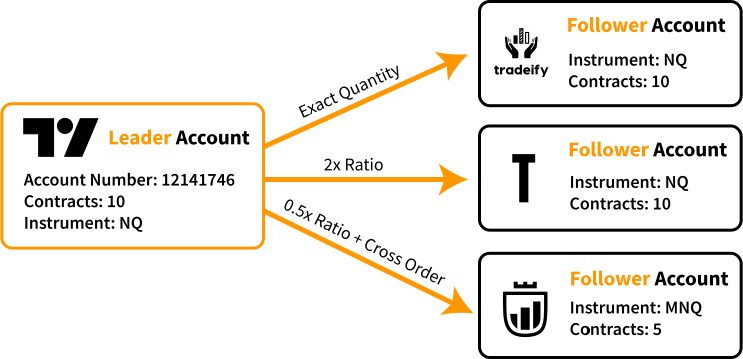
Scale trade sizes based on account ratios to match capital or custom exposure needs.
Copy trades between correlated instruments like MNQ → NQ or MES → ES seamlessly.
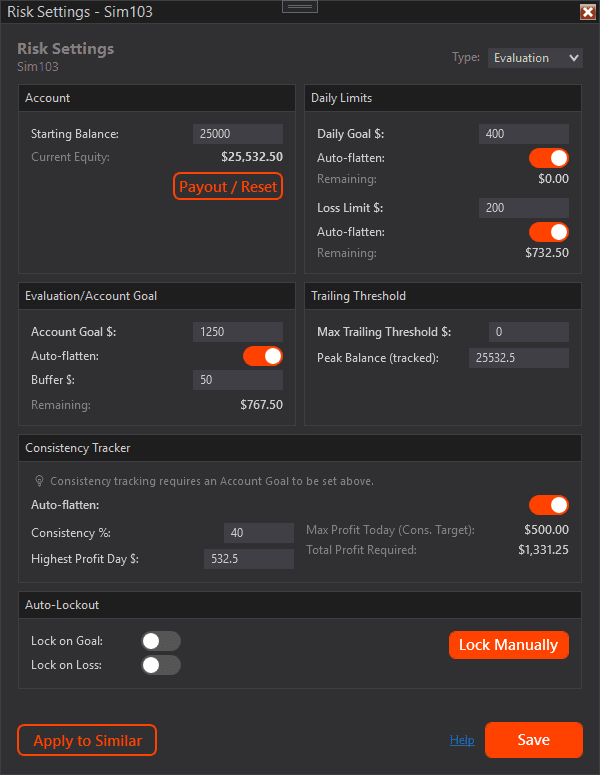
Advanced Risk Management
Daily Profit & Loss Limits
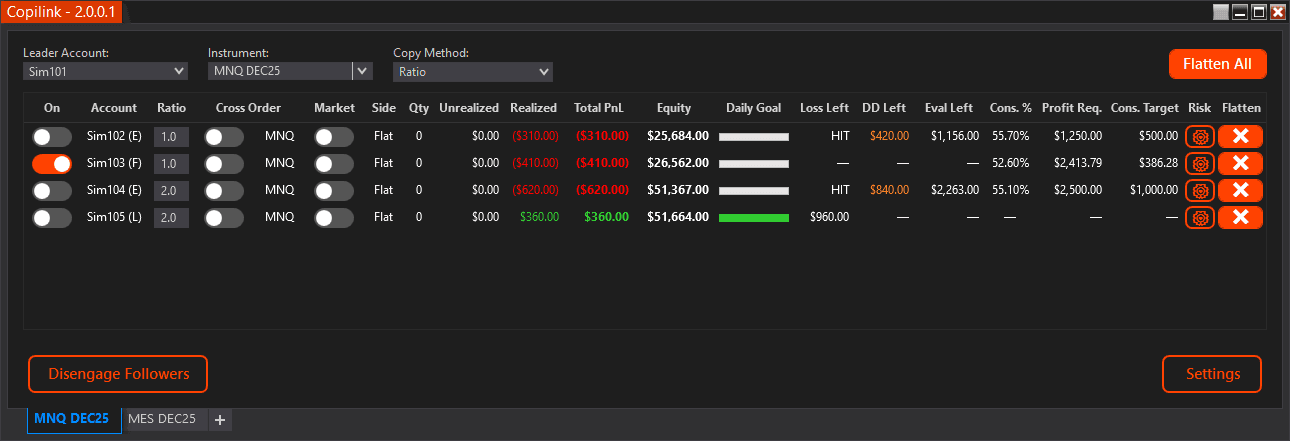
Define per-account daily profit goals and loss limits to stay compliant with your rules or prop firm rules. Copilink will automatically flatten and disengage followers once limits are hit.
- Optional Auto-flatten when daily profit or loss thresholds are reached
- Optional lockout until next trading session
- Fully customizable per follower account
Trailing Drawdown Tracker
Monitors real-time trailing drawdowns like Apex. Displays color-coded warnings and prevents overtrading before an account breaches its limit.
- Tracks trailing drawdown dynamically by peak balance
- Manually set or auto-update account high watermark
- Live intraday drawdown distance display per follower
Account Goal & Auto-Exit
Automatically flattens and disables followers once an evaluation or funded goal is achieved - including a configurable buffer to account for slippage and commissions.
- Auto-flatten when target + buffer amount is reached
- Option to disengage account after profit goal
- Goal buffer safety margin (e.g. +$20) to avoid dipping below target
Manual & Automatic Lockouts
Lock follower accounts manually or automatically after daily goals or losses. A safeguard against yourself.
- Manual lockout button per account.
- Auto-lockout on daily profit or loss limit triggers
- Restores automatically at next market open
- Prevents all trade copying when locked
Consistency Tracker
Stay within prop firm consistency rules by setting max allowed daily profit percentages relative to your best day.
- Auto-calculates from your highest day profit and required consitency percentage.
- Auto-flatten at calcluated max daily profit to stay within consitency requirments.
- Support for Funded and Evaluation accounts.
Per-Account Risk Profiles
Each account can have its own unique risk configuration - daily limits, goals, buffers, and lockouts - perfect for traders managing evaluations and live accounts simultaneously.
- Independent risk rules for each follower account
- Persistent data saved locally (no daily reset)
- Supports evaluation, funded, and live trading accounts
Simple, Clean and Built For Traders
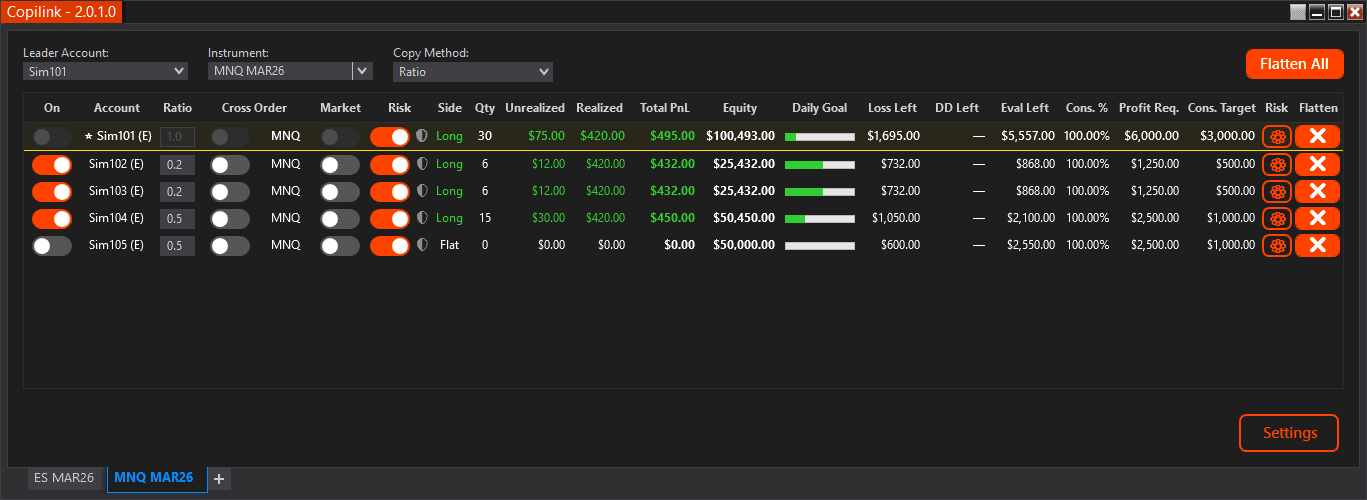
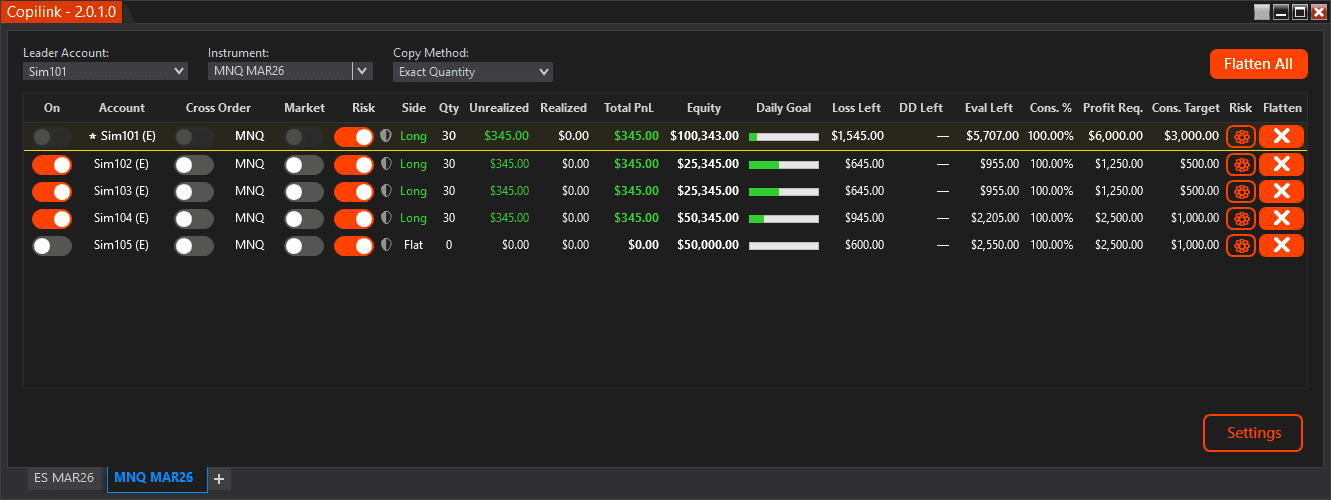
Here's what Copilink looks like inside NinjaTrader 8 - no clutter, no confusion.
Choose your leader and follower accounts with a couple of clicks
Set contract multipliers to match account sizes
See sync status at a glance
Make quick adjustments anytime
You don't need to be a tech expert to use Copilink.
Session-Based Lockout
Session-Based Lockout
Enforces controlled pauses after limits are reached. Eliminates revenge trading and restores discipline.
- Auto-disable accounts until next day market open
- Triggerable by daily loss, daily goals or manual lockout
- Prevents emotional overtrading and protects your accounts
Designed for traders who need structural discipline to prevent psychological spirals after losses.
Become a Copilink Partner
Partner with Copilink and earn generous commissions by referring traders to the fastest and most reliable trade copier on the market.
Earn 10% commission on every sale
Dedicated affiliate dashboard
Real-time earnings tracking
Fast and reliable payouts
Marketing materials provided
10%
Commission Rate
How It Works
Simple referral tracking
COPILINK
seamlessly copies trades from TradingView to your accounts.
Prop Firms and Platforms
Seamlessly connect with leading prop firms using NinjaTrader 8. Copilink runs in the background, mirroring your trades-even while you're charting and executing on TradingView.








Pricing
Start with what you need, upgrade when you're ready
Copilink Basic
Trade Copier only
One-time payment
Features
- Unlimited follower accounts
- TradingView support
- Cross-instrument support
- Ratio copying support
- Follower protection
- Market only mode
- Persistent settings
Copilink Risk
Trade Copier + Risk Management
One-time payment
Everything included
- Everything in Trade Copier
- Prop firm risk management
- Daily profit goal
- Daily loss limit
- Evaluation/account goal
- Consistency limits
- Intraday/trailing threshold tracking
- Auto session lockout
7-day free trial included on all plans - No credit card required
What is Trade Copying?
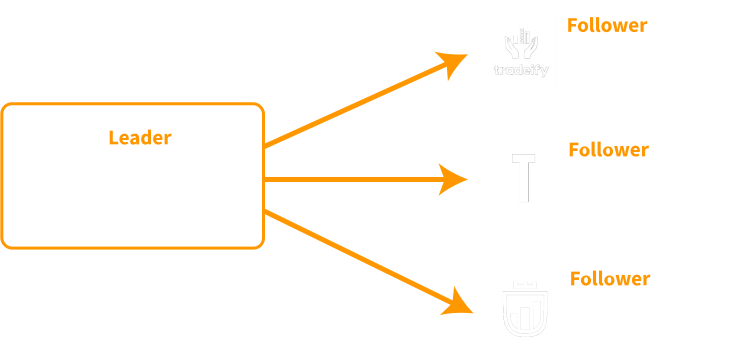
Trade copying is when one leader account automatically mirrors its trades to one or more folower accounts in real time.
Think of it like this: when the leader places a trade - buy, sell, modify, or close - all follower accounts instantly do the same. Perfectly synced, no delays, no manual effort.
Managing multiple accounts at once
Prop firm traders scaling across different firms
Copying from one master strategy to many clients or accounts
Balancing risk across various account sizes using contract scaling
How to Get Started with Copilink
Pick the plan the best fulfills your trading needs. Whether your a trader starting out or managing millions in capital, there's a plan that fits your needs.
Sing up with your email and a secure password, giving your access to the Copilink dashboard.
Once you've purchased your copilink licence, you will follow a simple guide to setup Copilink.
Select your leader, pick your followers and start trading.
You be the judge. Feel free to try it out 7 Days free of charge. No credit card required.
Yes! Copilink was born out of the need to copy trades from TradingView to prop firm followers.
If your prop firm account connects inside NinjaTrader, Copilink supports it.
Yes. Copilink offers a 7-day free trial so you can test trade copying for your prop or live accounts with no credit card required.
Leader-to-follower execution delay averages 1-2 ms. Additional delay depends on your network connection speed.
Because pricing is kept intentional: no cloud overhead, no inflated tiers, and a clear goal to make a high-performance copier and risk manager affordable for every trader.