How to Copy Trades Across Prop Firm Accounts
Learn how to copy trades across multiple prop firm accounts using NinjaTrader. This guide explains the safest and fastest way to manage evaluations and funded accounts with built-in risk controls.
How to Copy Trades Across Prop Firm Accounts
If you trade prop firm evaluations or funded accounts, you already know the problem. You place one trade, then rush to repeat it across multiple accounts. That approach breaks under pressure. You miss fills. You lose accounts.
Trade copying fixes this. You place one order. The system handles the rest.
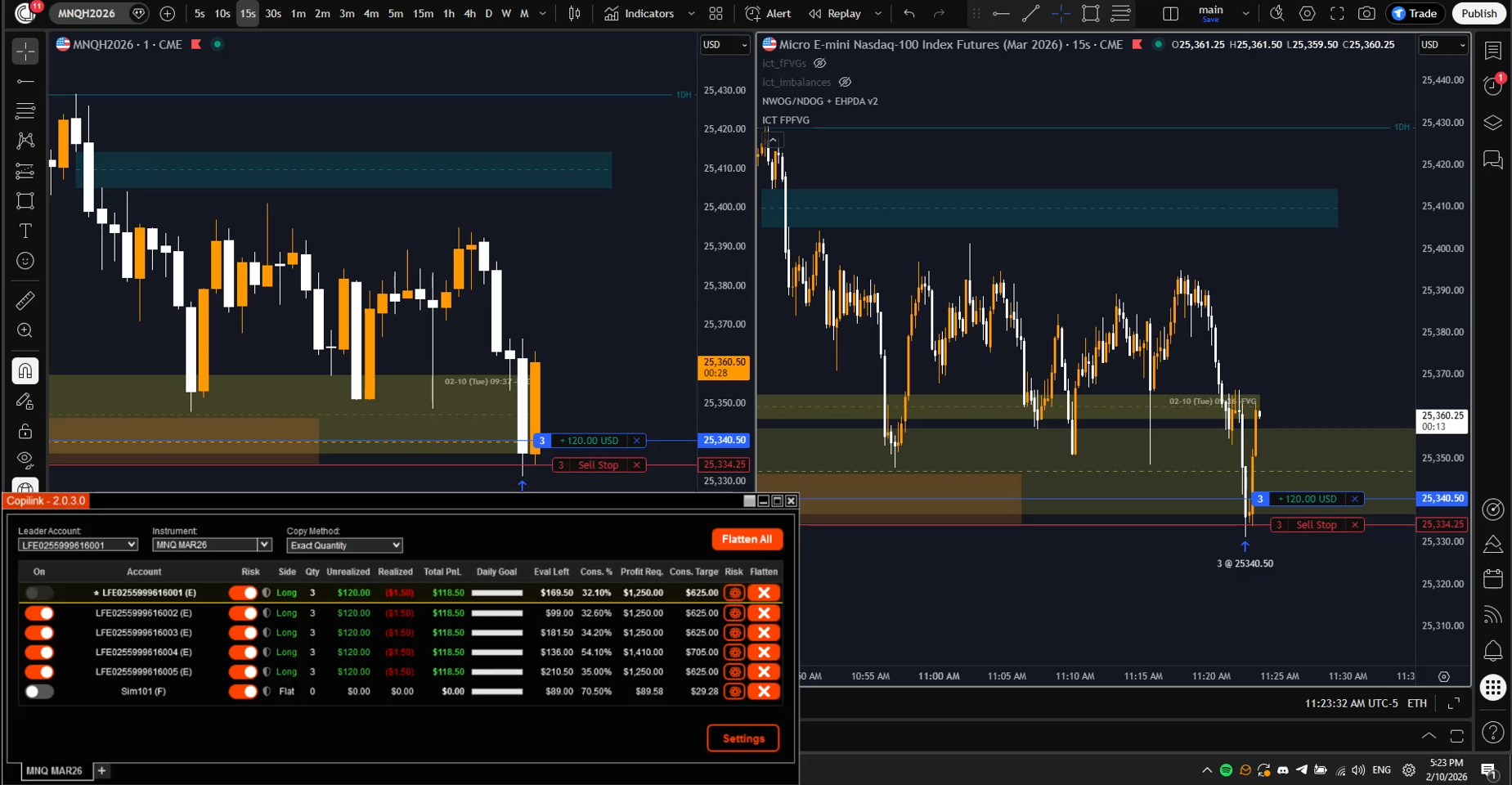
This guide shows you how to copy trades across prop firm accounts using Tradovate and Copilink. It focuses on speed, control, and rule enforcement.
Why Prop Firm Traders Need Trade Copying
Manual execution does not scale
Prop firms reward consistency and punish mistakes. Manual execution introduces delay and inconsistency. One late entry can invalidate an entire evaluation.
In 2024, over 68% of failed prop firm evaluations were caused by rule violations, not bad strategies. Most violations happened during fast markets when traders tried to manage multiple accounts at once.
Trade copying removes this failure point.
You trade once, all accounts follow
With a proper copier, you execute one trade on a leader account. Follower accounts receive the same order instantly. Position sizing adjusts automatically.
This lets you focus on execution instead of account management.
How Trade Copying Works in NinjaTrader with Tradovate
NinjaTrader runs locally
NinjaTrader executes orders locally on your machine. This matters. Local execution avoids cloud latency and API throttling.
A native copier runs inside NinjaTrader and listens to order events in real time. When the leader submits an order, followers receive it immediately.
Copilink operates this way.
Why cloud-based copiers fail prop traders
Cloud copiers route orders through external servers. This adds delay. In fast futures markets, even 50 ms matters.
More importantly, cloud systems introduce extra failure points. If the connection drops, copying stops, followers are left with open positions while you are helpless.
Prop firm traders need deterministic behavior.
Step-by-Step: Copy Trades Across Prop Firm Accounts
Step 1: Install a native NinjaTrader trade copier
Start with a copier designed specifically for NinjaTrader. Avoid generic platforms.
Copilink installs directly into NinjaTrader. No external dashboards. No cloud dependencies.
Internal link: NinjaTrader Trade Copier
Step 2: Choose your leader account
Your leader account is where you trade manually or via a strategy. This account sends orders to all followers.
Most prop traders use one evaluation account as the leader.
Step 3: Add follower accounts
Follower accounts receive copied trades. These can be:
- Multiple evaluation accounts
- Funded accounts
- Live personal accounts
Each follower can use its own sizing and risk rules.
Step 4: Configure position sizing
Never copy trades 1:1 unless account sizes match.
Copilink supports:
- Ratio-based sizing
- Fixed contract sizing
- Micro-to-mini scaling
This lets you trade MES on evals and ES on funded accounts without changing behavior.
Internal link: Fast Trade Copying
Step 5: Enable prop firm risk rules
This step separates professional setups from risky ones.
Prop firms enforce:
- Daily loss limits
- Trailing drawdown
- Consistency rules
- Session limits
Copilink enforces these rules automatically. If a limit triggers, the account flattens and locks.
Internal link: Prop Firm Risk Management
Step 6: Start trading
Once enabled, trade normally.
Orders replicate instantly. Settings persist across restarts. No daily reconfiguration.
Common Prop Firm Use Cases
Multiple evaluation accounts
You trade one setup. All evaluation accounts follow. Risk limits stay isolated per account.
Funded account scaling
Copy trades from a master account into multiple funded accounts. Adjust size without changing execution.
Best Practices for Copy Trading
- Test your setup in sim first
- Use ratio sizing, not fixed 1:1
- Enable auto-flatten on rule breaches
- Keep leader execution clean and simple
According to CME execution studies in 2024, traders using automated replication reduced execution errors by over 40%.
Frequently Asked Questions
Can I copy trades across different prop firms?
Yes. Each account runs independently with its own rules.
Does trade copying increase slippage?
No. Native copying minimizes delay. Execution stays within milliseconds.
Is this allowed by prop firms?
Most prop firms allow trade copying. You remain responsible for following their rules.
Can I stop copying instantly?
Yes. You can disable followers at any time.
Do settings reset when NinjaTrader restarts?
No. Copilink persists all configurations.
Getting Started
If you trade multiple prop firm accounts, manual execution works against you. Trade copying fixes that.
Start with a native NinjaTrader solution built for prop firm rules.
Internal links:
You trade once. Your system handles the rest.
Related Articles
Ready to Start Trade Copying?
Try Copilink free for 7 days. No credit card required. Copy trades across unlimited prop firm accounts.