TradingView to NinjaTrader: How to Automate Your Prop Firm Trades in 2026
You built your strategy in TradingView. Your prop firm lives in NinjaTrader. Here's exactly how to bridge that gap and automate execution without violating evaluation rules.
TradingView to NinjaTrader: How to Automate Your Prop Firm Trades in 2026
Here's a friction point that a surprising number of prop traders run into. Their analysis lives in TradingView — the charts are set up perfectly, the Pine Script strategy backtests cleanly, the alerts are configured. But their funded account is on Tradovate, connected through NinjaTrader. Two separate ecosystems with no native bridge between them.
So every time an alert fires, they're manually translating a signal into a live order. Which means they're introducing latency, introducing human error, and — depending on how their prop firm's rules are structured — potentially introducing consistency problems because their execution speed varies from signal to signal.
There is a clean solution to this. It's not as complicated as the NinjaTrader forums make it look. Here's the full picture.
Why This Setup Matters for Prop Traders Specifically
Prop firm trading has a few unique demands that make automation more valuable than in ordinary retail trading.
You're operating under strict rule frameworks — daily loss limits, trailing drawdowns, consistency requirements. Manual execution introduces the risk of placing a trade slightly too large (because you misread the position sizing), or entering after a news event blackout window without realizing it, or missing a stop placement that leaves a position unprotected when you step away from the screen.
Automation doesn't eliminate risk. But it does eliminate the category of errors that come from human attention limitations — and those errors, in a prop firm evaluation, are disproportionately costly. One rule violation doesn't just lose you money; it can void an entire challenge.
Beyond risk management, there's the scaling angle. If you're running multiple funded accounts — which is where serious prop trading income actually comes from — manually executing across all of them from TradingView alerts is essentially impossible. Automation is what makes multi-account prop trading operationally viable.
The Technical Reality: How TradingView Connects to NinjaTrader
TradingView and NinjaTrader don't have a native direct integration. That's just the current state of things. But the connection exists via a webhook/alert bridge architecture, and once you understand the flow, it's not mysterious:
- Your TradingView strategy or alert fires based on your signal conditions
- TradingView sends a webhook (a structured HTTP message) to a designated endpoint
- That endpoint — running locally or via a bridge service — receives the alert and translates it into a NinjaTrader order
- NinjaTrader executes on your connected broker account (Tradovate, Rithmic, etc.)
- If you're running a trade copier like Copilink, those orders also replicate to all your follower accounts in real time
The critical piece is step 3 — the bridge. This is what Copilink handles. It's designed specifically for this workflow: TradingView signals in, NinjaTrader execution out, with prop firm risk rules enforced at the point of execution.
Setting Up TradingView Alerts for Automated Execution
On the TradingView side, the setup is relatively standard. You'll write your alert conditions in Pine Script (or use an existing strategy), and configure the alert to send a webhook with a JSON payload that specifies the action.
A basic alert message format looks something like this:
{
  "action": "buy",
  "instrument": "MES",
  "quantity": 2,
  "orderType": "market"
}
The specific format depends on what your NinjaTrader bridge expects — Copilink's documentation outlines the exact schema. The important things to get right:
- Instrument naming — TradingView's symbol naming doesn't always match NinjaTrader's. You'll map "CME_MINI:ES1!" to "ES 03-26" or however NinjaTrader identifies the current contract
- Alert timing — make sure your alert fires on bar close, not intrabar, unless you specifically need intrabar execution (and have a good reason for it)
- Webhook URL — this is the endpoint your bridge software is listening on. It needs to be accessible from TradingView's servers — meaning your local machine needs a public-facing endpoint or you're running the bridge on a VPS
The NinjaTrader Side: What's Actually Happening
NinjaTrader receives the translated order and executes it on your connected broker account. For most prop firm traders, that means either a Tradovate account or a Rithmic-based account, depending on which firm and plan you're using.
One important nuance: Copilink integrates through NinjaTrader, not directly with Tradovate. So your Tradovate prop firm account needs to be linked to NinjaTrader first. When a trade triggers via TradingView → webhook → NinjaTrader, your Tradovate account executes through NinjaTrader's broker adapter. This is standard for prop firm trading on Tradovate and works with Apex, Topstep, Tradeify, MyFundedFutures, and others.
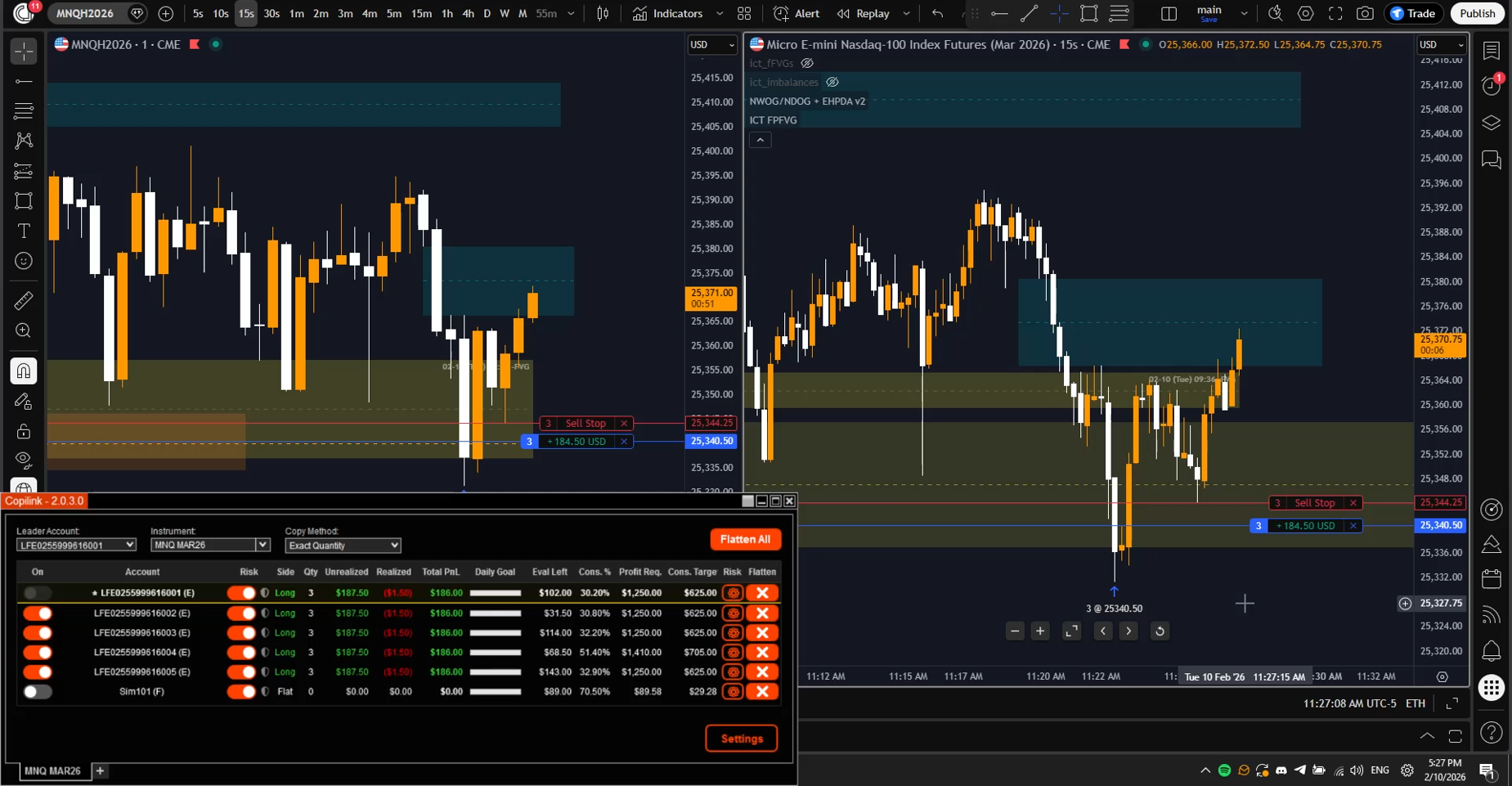
Copilink runs as a NinjaTrader 8 add-on. It's not a cloud service sitting between your tools — it's local to your NinjaTrader instance, which means the execution path is: TradingView alert → webhook → Copilink (inside NT) → broker. That architecture is what produces the ~1.6ms execution latency that matters during fast-moving markets.
Prop Firm Risk Rules + Automation: How to Stay Compliant
This is the part that a lot of automation guides skip over, and it's the part that matters most for prop traders. Automating your entries is only half the job. Your automation also needs to respect the rules that govern your accounts.
Copilink's risk management layer sits between your incoming TradingView signals and your order execution. Before any order goes through, it checks:
- Is this account above its daily loss limit? If yes, block the order and flatten existing positions
- Has the trailing drawdown threshold been approached? Apply the configured protection rules
- Is this account in an evaluation stage with a profit target? Track cumulative P&L accordingly
- Would this trade create a hedging violation across accounts? Flag or block it
- Does this trade respect the consistency rule? Monitor daily contribution percentage and alert when approaching the threshold
These checks happen in real time, before execution. That means your automation isn't just running your strategy — it's running your strategy inside the rules, automatically. Your TradingView signal fires, but if account #3 is at 95% of its daily loss limit, that account doesn't execute the trade while your other accounts do.
A Realistic Example: One Strategy, Five Prop Accounts
Here's what this looks like in practice. Say you're running a momentum strategy on the NQ (Nasdaq E-mini). The strategy is coded in Pine Script and backtests well. You want to run it across one evaluation account and four funded accounts simultaneously.
Without automation, that means five manual executions every time a signal fires. At 5-15 signals per session, that's 25-75 manual trades — with the inherent delays, mis-clicks, and mental load that comes with it.
With the TradingView → Copilink → NinjaTrader setup:
- Signal fires on TradingView
- Alert sends webhook to Copilink (via NinjaTrader)
- Copilink checks all 5 accounts against their individual risk parameters
- Orders execute on the 4 accounts that are within their rules; the 5th account (say it hit its daily loss limit yesterday and is locked) skips the trade
- Positions are managed — stops and targets replicate automatically as they're placed on the leader
- When you close the position on the leader, all follower accounts close simultaneously
You didn't touch accounts 2 through 5 at all. You traded one chart, and the infrastructure handled the rest.
What About Prop Firms That Restrict Automation?
Policies vary, and this is worth getting specific about. Most futures prop firms permit trade copiers for your own accounts — the automation concern for most firms is about bots that trade autonomously without any human decision-making involved, not about tools that replicate a human trader's decisions across multiple accounts.
The distinction: you're still making the trading decisions (via your TradingView strategy that you designed, tested, and deployed). The automation is handling execution mechanics — not generating the trading signals independently.
Take Profit Trader is the main exception on the list of major futures prop firms — they're stricter about automated execution and prohibit trading bots explicitly. Always check the specific terms for your firm. Apex, Topstep, Tradeify, and MyFundedFutures are all compatible with this workflow.
If you're ever uncertain about a firm's policy, Copilink's FAQ addresses firm-specific compatibility questions. It's also worth a direct email to whatever firm you're evaluating — they're generally clear about what's allowed if you ask directly.
Getting Started
The setup process, condensed:
- Install NinjaTrader 8 and connect your prop firm broker account (Tradovate or Rithmic)
- Install Copilink as a NinjaTrader add-on and configure your leader/follower account structure
- Set risk parameters for each account (daily loss limit, drawdown ceiling, consistency thresholds)
- Configure your TradingView alerts to send webhooks in the correct format
- Test with paper trading before going live on funded accounts
- Run a live session, monitor the replication and risk enforcement, adjust parameters as needed
Copilink offers a 7-day free trial — long enough to run through this full setup and validate the execution before you commit. Start at copilink.com.
Related Articles
Ready to Start Trade Copying?
Try Copilink free for 7 days. No credit card required. Copy trades across unlimited prop firm accounts.