NinjaTrader VPS: what it actually speeds up, and who needs one
A NinjaTrader VPS speeds up your follower copies, not your own trades. Copies take about 120 ms in North America and 200 ms in Europe in Copilink's data, and most traders don't need one.
From Copilink, which makes trade copiers for running several futures prop firm accounts from one leader. See how it works →
A VPS is a Windows machine you rent in a data center and control over Remote Desktop. Moving your platform and copier onto one changes where they run, and for a trader outside the US that matters for one thing: how fast your follower accounts get the leader's trade. It does almost nothing for the trade you place yourself.
Copilink runs on the machine you install it on (Copilink Standalone on a Windows PC, Mac or Windows VPS, and Copilink for NinjaTrader 8 wherever NinjaTrader 8 runs) and sends follower orders from there with no Copilink server in between, so that machine's location sets your copy delay.
If you do get a VPS, check your prop firm first: Bulenox bans VPS use, while Boxcar gives its traders a free Chicago VPS.
What a VPS speeds up, and what it doesn't
Your own trades: no real gain
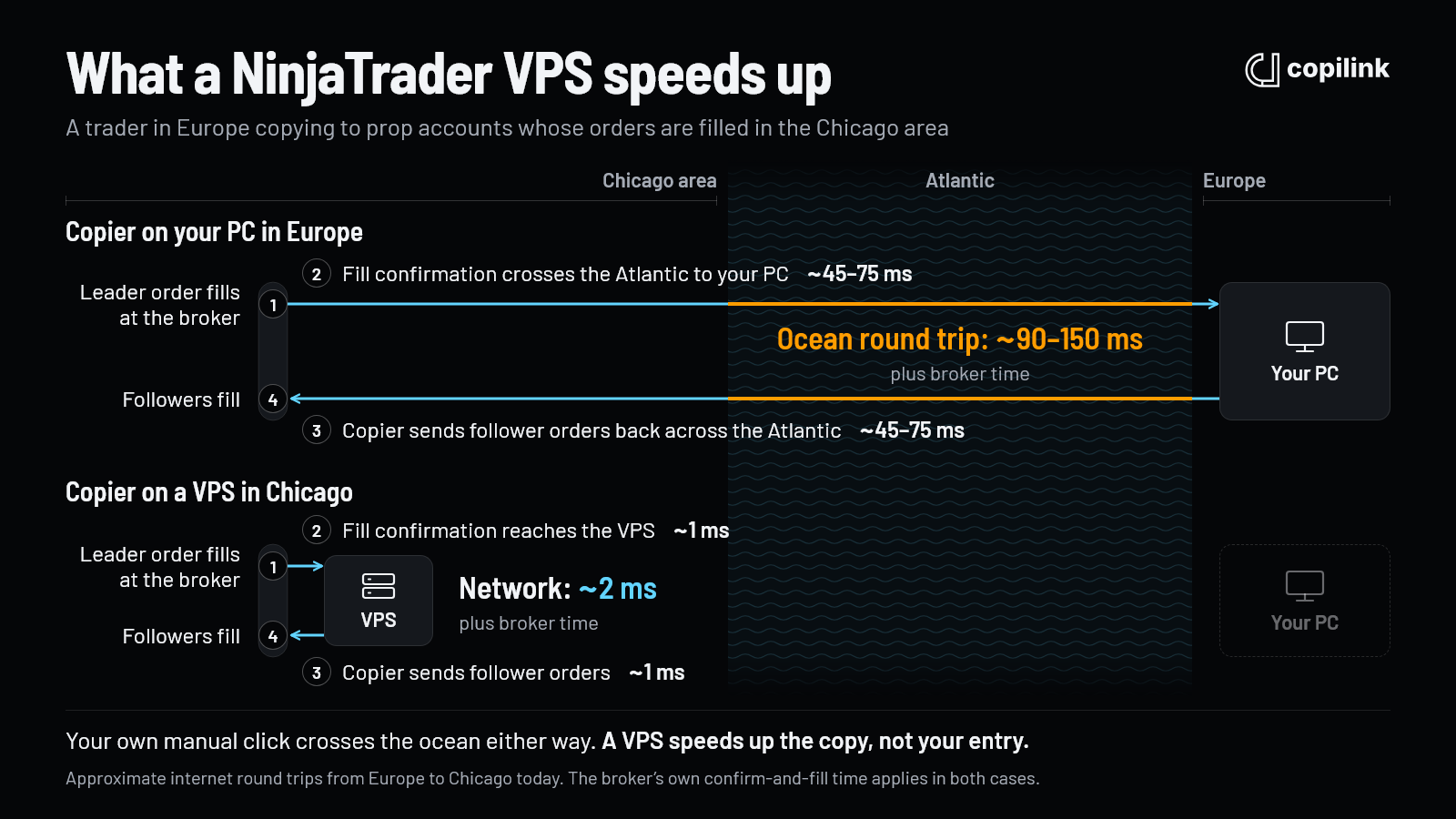
Say you trade by hand from Europe through Remote Desktop to a VPS in Chicago. Your click still has to cross the Atlantic to reach the VPS, roughly 45 to 75 ms one way, and the VPS then sends the order to the broker in about a millisecond. Trading from home, the order goes from Europe to the Chicago area directly, which is about the same distance. It's roughly a wash.
It can even feel slightly worse. The Remote Desktop picture you're watching makes the same trip across the ocean, so you see prices a little later than a platform running on your own screen would show them.
Follower copies: this is where the gain is
A copier's job is to react to the leader's fill and fire the follower orders. On a home PC in Europe, that takes a full ocean round trip:
- The leader's order fills at the broker in the Chicago area.
- The fill confirmation travels to your PC in Europe, about 45 to 75 ms.
- The copier sends the follower orders back to Chicago, another 45 to 75 ms.
Physics sets the floor here. Even on a perfectly straight fibre, light needs about 63 ms for a round trip between London and Chicago, and real internet routes take about 92 ms from London and 107 ms from Frankfurt (WonderNetwork). The fastest cable built for trading firms, between New York and London, still takes about 59 ms (Equinix), and Chicago is another 1,100 km inland.
On a VPS near the broker, steps 2 and 3 take a millisecond or two each. In a fast market, like a news release or a breakout, that can be the difference between followers filling at the leader's price and filling a few ticks worse. It also shortens the moments when the leader and followers are briefly out of step, for example on partial fills or quick scale-outs.
Automated leaders, market data and uptime
- Automated leaders. If the leader is a strategy running on the VPS, the leader's own orders get faster too, because the signal starts next to the broker and no click has to cross the ocean.
- Market data. Prices reach the VPS sooner, which helps anything that reacts to price, such as stop management.
- Uptime. Often the bigger real-world benefit. Home internet drops, power cuts and Windows restarts stop being a risk to your open copies.
All of this assumes the copier runs on the same machine as the platform. If copying goes through a cloud relay between machines, the relay's location sits in the path too, and it matters just as much.
None of this is specific to NinjaTrader. The same holds for any futures trading VPS, whether you copy Tradovate and Rithmic accounts with Copilink Standalone or place your trades on TradingView: what matters is where the copier runs.
What we measured: copy delay by region
Copilink measures copy delay as the time from the leader's entry fill to the follower's entry fill, using the broker's own fill timestamps. That covers everything in between: the fill notice reaching the copier, Copilink's processing, the follower order travelling to the broker, and the broker filling it.
On a recent sample of about 2,000 copied follower trades from Copilink Standalone users who sync their data, half reached the follower within 103 ms of the leader's fill, and 9 in 10 within 391 ms. By region:
| Region | Average copy delay |
|---|---|
| North America | about 120 ms |
| Latin America & Caribbean | about 175 ms |
| Europe | about 200 ms |
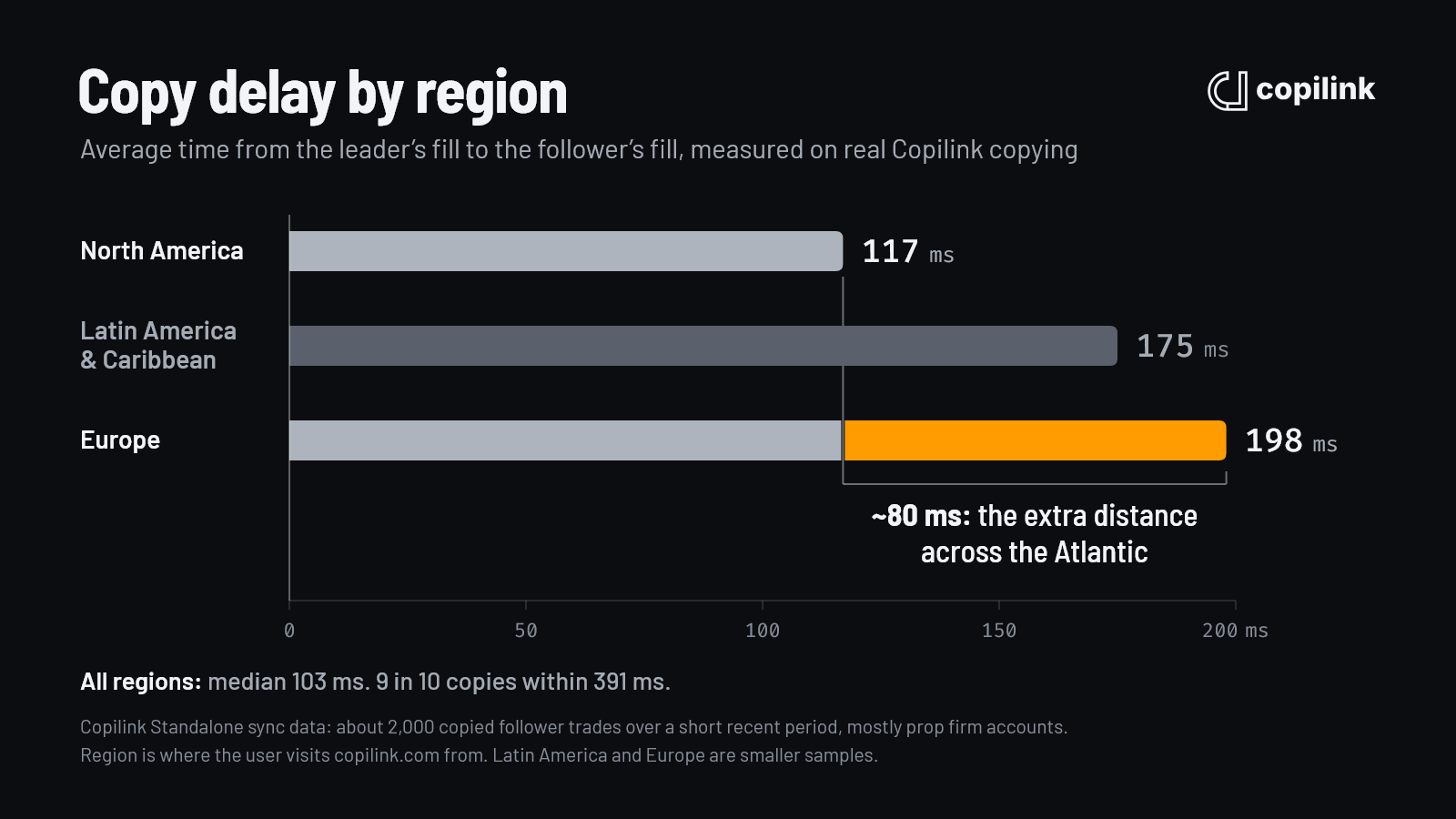
The roughly 80 ms between North America and Europe is the extra distance across the Atlantic: from most of Europe a round trip to Chicago takes about 90 to 130 ms, and from most of the US about 20 to 50 ms. That extra distance is the part a Chicago VPS removes. We can't see which users run a VPS, so treat that as the expected gain rather than a measured one. Most of the remaining 100 ms or so is the broker confirming and filling orders, and no VPS changes that. Copilink's own processing is about 5 ms of it, as measured in our copy latency benchmark. So moving a European copier to a Chicago VPS should get you close to North American numbers, not to zero.
About the data: it's a short recent sample, mostly from prop firm accounts. Region is where each user visits copilink.com from, which may differ from where their copier runs. Days averaging over 500 ms are treated as connection stalls and left out of the regional averages. Europe and Latin America are smaller samples than North America.
Do you need a NinjaTrader VPS?
Most traders don't, and I don't use one. I've traded futures for about eight years, and today I trade 5 to 10 prop accounts and a live account from my own PC in Europe. I place my trades on TradingView and Copilink Standalone copies them across Tradovate and Rithmic accounts at several firms. I've never had a big problem.
Once in a while my internet drops. I always trade with a stop loss, and Copilink copies that stop to every follower, so the stops sit at the broker on every account whether my PC is online or not. If price turns against me, the stops do their job everywhere. If it goes my way, even better. Nothing gets copied while my PC is offline, so if a trade needs attention before the connection comes back, I manage it from my phone.
Running it locally is simply easier. There's no VPS to log in to, set up or look after, and everything is right there on my screen where I can manage it. My trades are short MNQ and NQ scalps, and the extra delay on the followers costs me a few dollars of slippage. I'm fine with that.
How much the distance costs you depends on where your copier sits. Every copied trade pays one round trip to Chicago:
| Copier in | Round trip to Chicago |
|---|---|
| New York | 18 ms |
| Los Angeles | 52 ms |
| London | 92 ms |
| Frankfurt | 107 ms |
| Warsaw | 120 ms |
| São Paulo | 130 ms |
| Tokyo | 148 ms |
| Athens | 150 ms |
| Sydney | 185 ms |
| Singapore | 218 ms |
| Mumbai | 233 ms |
These are server-to-server pings from WonderNetwork on 25 Oct 2026; a home connection adds a few milliseconds, and Wi-Fi more. On a Chicago VPS the same trip takes a millisecond or two.
A VPS is worth it if:
- You're far from Chicago and copy to followers in fast markets. From Tokyo, Sydney or Singapore, every copy carries 150 to 220 ms of travel that a Chicago VPS would remove.
- You run an automated strategy that should keep trading while you're away from the desk.
- Your home internet or power isn't reliable.
- You're on a Mac and need NinjaTrader 8, which runs only on Windows. A Windows VPS is one way. Copilink Standalone is another: it runs natively on macOS and connects to Tradovate and Rithmic without NinjaTrader.
Check your prop firm's rules first
Firms don't all treat a VPS the same way. Among the firms in our prop firm directory, two address it directly:
- Bulenox bans VPN and VPS use in its Master Account Agreement. See the Bulenox rules.
- Boxcar includes one free Chicago VPS per customer with an evaluation or straight-to-funded purchase, free for as long as you keep an active Boxcar account. See the Boxcar rules.
If your firm's agreement says nothing either way, ask its support before you move your accounts.
NinjaTrader system requirements
NinjaTrader's own requirements for NinjaTrader 8:
| Minimum | Recommended | |
|---|---|---|
| Operating system | Windows 11, or Windows Server 2016 or later, 64-bit | Same |
| Processor | 1 GHz 64-bit | 2 GHz quad-core 64-bit |
| Memory | 2 GB | 8 GB |
| Storage | Not specified | SSD |
| Graphics | DirectX 10 card highly recommended | DirectX 10 card |
| Other | .NET Framework 4.8, 1024 x 768 screen |
What actually uses your machine is the charting: how many charts, indicators and days of data you load. Copiers are light. On my PC, Copilink Standalone and TradingView use so little CPU and memory that a Task Manager screenshot would show nothing worth seeing. If NinjaTrader feels slow, trim your workspaces before you buy more hardware.
NinjaTrader 8 runs only on Windows. On a Mac you need a Windows VPS, Parallels, or a copier that doesn't need NinjaTrader; see how to run NinjaTrader on a Mac.
What to look for in a NinjaTrader VPS
- Chicago location. CME's matching engine is in Aurora, just outside Chicago, and Rithmic runs servers there too.
- Windows Server 2022 or 2025. NinjaTrader supports Windows Server 2016 or later.
- At least NinjaTrader's recommended spec, a quad-core CPU and 8 GB of memory, with more memory if you run many charts.
- Dedicated CPU cores. Cheap plans share cores between customers, so someone else's busy period can slow your platform at the worst moment.
- SSD storage.
- Monthly billing, so you can run a real session before you commit.
- Your licence. A VPS counts as a machine for Copilink Standalone: Core includes one and Suite two, and extra machines can be added to either plan. One profile runs on one machine and can't span your PC and the VPS. Copilink for NinjaTrader 8 is licensed to your NinjaTrader account email, so sign in to NinjaTrader on the VPS with that same email.
This guide doesn't recommend specific providers; compare current specs and prices yourself.
How to set up a Windows VPS for copying
- Order Windows Server 2022 or 2025 in a Chicago location. You'll get a Remote Desktop address and login.
- Connect with Remote Desktop Connection on Windows, or Microsoft's Windows App on a Mac.
- Schedule Windows Update outside your trading hours, so an update restart can't land mid-session.
- Install your copier and connect your accounts: Copilink Standalone, or NinjaTrader 8 (8.1.7 or newer) with Copilink for NinjaTrader 8. For NinjaTrader, see how to connect Tradovate to NinjaTrader and how to connect multiple Rithmic accounts.
- Disconnect from Remote Desktop instead of signing out. Disconnecting leaves your programs running; signing out closes them, and Copilink only copies while it's open.
- After any VPS restart, check Copilink is running and copying before the session starts. If you run Copilink for NinjaTrader 8 unattended, turn on VPS Mode: after a risk limit flattens an account, it keeps that account disabled until the next trading day, so it can't re-enter on its own.
- Place one micro contract trade during a normal session and confirm every follower fills at the size you expect.
FAQ
Do I need a VPS for NinjaTrader?
Most traders don't. A VPS mainly shortens the delay before followers copy a trade, by about one ocean round trip if you trade from outside North America. Get one if you're far from Chicago and copy in fast markets, run an automated strategy, or have unreliable internet or power.
Is a VPS faster than trading from home?
For your own manual trades, no: your click crosses the same distance either way. For copied follower orders, yes. In Copilink's data, Europe averages about 200 ms from leader fill to follower fill and North America about 120 ms, and a Chicago VPS should remove most of that difference.
What VPS specs do I need for NinjaTrader 8 with multiple charts?
Start from NinjaTrader's recommended spec, a quad-core CPU, 8 GB of memory and an SSD, on Windows Server 2016 or later, and add memory as you add charts and indicators. The copier itself uses very little.
Do prop firms allow a VPS?
It depends on the firm. Bulenox's agreement bans VPS and VPN use, while Boxcar gives its traders a free Chicago VPS. Check your firm's agreement before you move.
Continue this topic
Explore Copilink for NinjaTrader 8 →Trade without NinjaTrader
Copilink Standalone is a futures trade copier for Tradovate and Rithmic on Windows and macOS. The trial lasts 14 days and does not require a card.
Already use NinjaTrader 8?
The Copilink NinjaTrader 8 trade copier runs inside NinjaTrader 8 on Windows and includes a separate 7-day trial.