Copilink Standalone · Rithmic
Rithmic trade copier for prop firm accounts.
Sign in with the Rithmic login your firm issued and pick its system. Every order on your leader then goes to the followers you chose, Rithmic or Tradovate, each at its own size, and Copilink acts when an account drifts from the leader or breaks a limit. No NinjaTrader, no plugin, no hosted middleman.
No card · 14 days · full Suite access
R|Trade Copier or Copilink?
Rithmic's own copier can distribute orders among designated Rithmic accounts when your provider enables it. Confirm access and charges with that provider. Copilink adds cross-route profiles, per-follower sizing and account-level safeguards.
| Feature | Rithmic R|Trade Copier | Copilink Standalone |
|---|---|---|
| Where it runs | On Rithmic's side, configured in R|Trader Pro. | In the Copilink desktop app on your Windows PC or Mac, signed in with your Rithmic username, server location and system. |
| Accounts it can include | Rithmic accounts. | Rithmic accounts plus Tradovate accounts, from any saved connection, in one profile. |
| Follower sizing | Per-account distribution as configured in Rithmic. | The leader's quantity or a ratio set per follower, rounded down. With Cross on, an ES leader can drive an MES follower. |
| When a follower drifts | Not part of the copier. | After your delay, a follower that is mis-sized, still open while the leader is flat, or reversed gets a flatten request and can be switched off. |
| Prop firm rules | Not part of the copier. | Daily loss, daily profit and evaluation limits for each account, with a flatten request on breach. Drawdown and funded consistency are tracked only. |
| Record of what happened | Rithmic order history. | Activity and incident history, a trade log kept on your computer, and a web journal if you turn on cloud sync. |
| Cost | Ask your broker or firm whether Trade Copier is enabled for your accounts and whether it charges a fee. | Core is $28.88 a month. You can try Suite for 14 days without a card. |
Your account provider controls R|Trade Copier access and may charge for it.
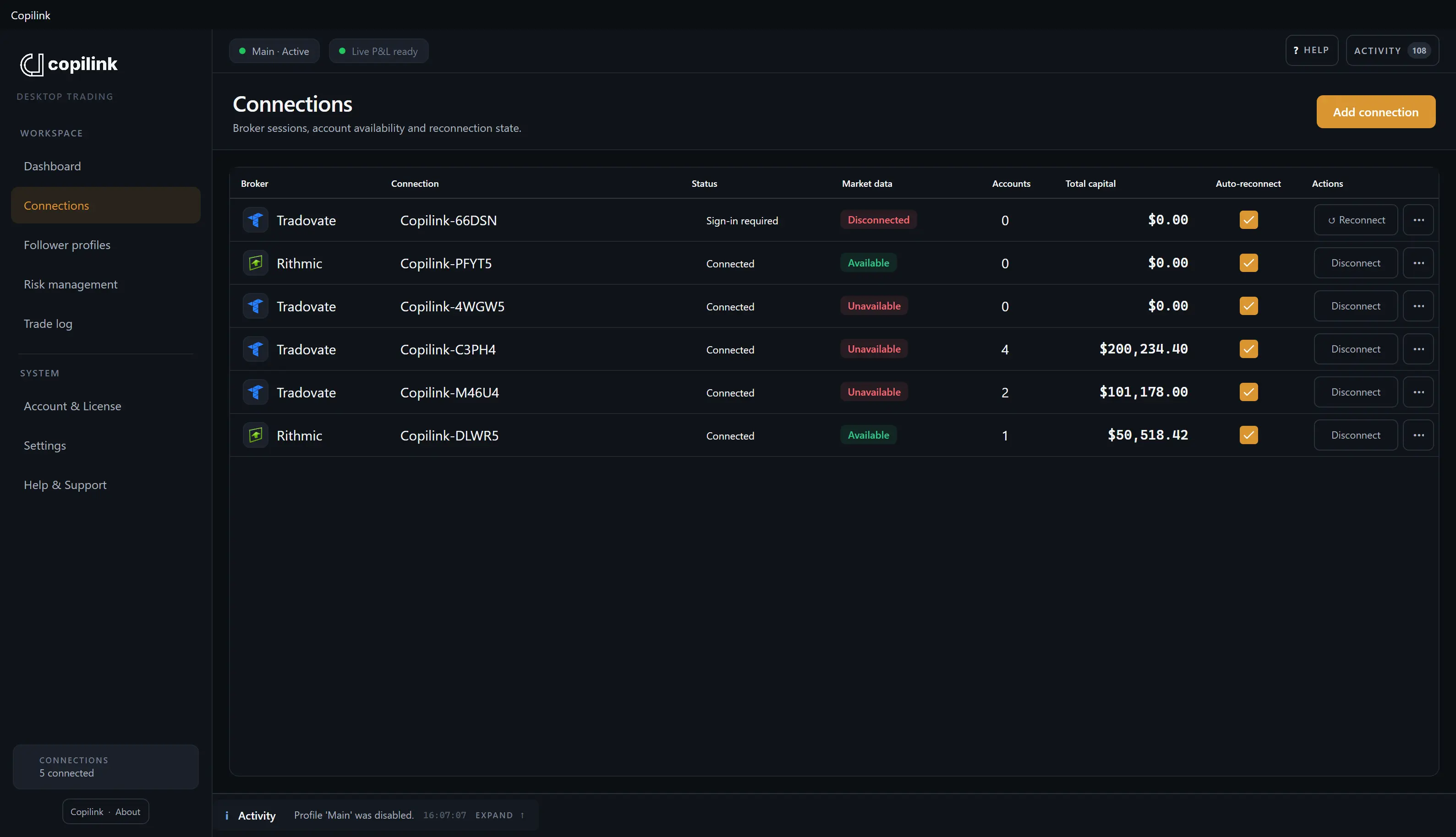
Connected with your Rithmic login, nothing in between.
Type your Rithmic username and password, choose the server location your broker or prop firm gave you, then pick the exact system from the list Rithmic sends back. Copilink connects and shows every account on that login. The password is saved in Windows Credential Manager or macOS Keychain, never in Copilink settings or backups.
The system you were given, no substitution
Copilink lists the systems Rithmic allows for your login and location. You pick one; it never guesses.
Simulation only when Rithmic says so
Paper and Test systems are treated as simulation when the system name identifies them that way. Everything else is treated as real.
Connection states you can read
Connecting, Connected, Authentication failed, Network unavailable, and Rate limited are shown as they happen, with what to do next.
Tradovate in the same profile
Tradovate accounts can follow a Rithmic leader. Rithmic logins come with live prices, and Copilink passes them along to Tradovate accounts trading the same contracts.
Rithmic systems by prop firm
Each Rithmic login needs the system and server issued for that account. Copilink lists the systems Rithmic returns for your login. Running several Apex accounts? The Apex trade copier page covers that setup.
| Firm | Published system | Copy trading |
|---|---|---|
| Lucid Trading | Confirm in the issued account and Rithmic login | Allowed, with rules |
| Tradeify | Confirm in the issued account and Rithmic login | Own accounts |
| Apex Trader Funding | Confirm in the issued account and Rithmic login | Allowed, with rules |
| Boxcar Trading | Confirm in the issued account and Rithmic login | Allowed, with rules |
| Take Profit Trader | Rithmic Paper Trading (published login instructions) | Tools restricted |
| Bulenox | Confirm in the issued account and Rithmic login | Tools restricted |
| TradeDay | Rithmic Paper Trading (published login instructions) | Allowed, with rules |
| Elite Trader Funding | Confirm in the issued account and Rithmic login | Tools restricted |
| BluSky Trading | Rithmic Paper Trading (published login instructions) | Allowed, with rules |
| DayTraders.com | Confirm in the issued account and Rithmic login | Allowed, with rules |
| Earn2Trade | Rithmic Paper Trading (published login instructions) | Copiers prohibited |
TradeDay, Take Profit Trader, BluSky and Earn2Trade publish Rithmic Paper Trading as the system; confirm the others in your Rithmic login. Bulenox charges $100 a month for third-party Rithmic API tools and restricts commercial software. NinjaTrader Desktop can hold only one Rithmic connection at a time; Standalone is a separate app.
Size each follower. Protect each account.
Every follower carries its own size and its own limits. A Rithmic evaluation and a Tradovate funded account can sit behind the same leader, and when one of them hits a limit, the other keeps copying.
Quantity or ratio, per follower
A follower copies the leader's contract count or applies its own ratio, rounded down. One contract at a 0.5 ratio sends nothing, so a micro follower at 1.0 is usually cleaner.
ES leader, MES follower
With Cross on, 1 ES at a ratio of 1.0 becomes 1 MES, not 10. The ratio still sets the count.
When a follower drifts
Still the wrong size, open after the leader went flat, or reversed once your 1 to 120 second delay runs out? Copilink requests a flatten and can switch that follower off. Turning it back on is your call.
Limits that act, limits that watch
Daily loss, daily profit and evaluation goals send a flatten request when breached, and a leader breach turns the profile off. Trailing drawdown and funded consistency are tracked only, so keep your firm's own limits in place.
Orders, edits and fills
Copilink follows working orders, edits, cancels, partial fills and fills as far as each broker allows. Market orders are copied from fills, so a follower is not sent the same size twice.
R|Trader Pro has the final word
A flatten request is not a flat account. Check the position in R|Trader Pro before you turn anything back on.
What it does not do
Copilink follows the orders and fills on your leader account. It is not a signal service, and it doesn't shield you from broker, market or connection problems.
No webhook or signal input
Copilink needs a leader account to copy from. Telegram messages, alerts and webhooks can't start a trade, there is no phone app, and a leader on one computer can't feed followers on another.
Start flat
A profile copies from the moment it goes live. Positions already open aren't matched, and anything the leader did while copying was off isn't replayed.
Fills won't always match
Each broker fills each follower on its own. Slippage, thin liquidity, rejects and rate limits can leave a follower with a different price, size, or no fill.
Rithmic P&L and rate limits are Rithmic's
Protection that depends on live P&L or market data waits for Rithmic to deliver it. When Rithmic rate-limits a login, stop repeated actions and verify orders at the broker.
Rithmic questions, answered plainly.
R|Trade Copier, logins and systems, Tradovate followers, plugins, and what happens when Rithmic drops or rate-limits a connection.
Does Rithmic have its own trade copier?
Yes. Rithmic's R|Trade Copier, configured through R|Trader Pro, can replicate orders across designated Rithmic accounts when your provider enables it. Ask the broker or firm about access and charges. Copilink adds Tradovate accounts in the same profile, per-follower sizing and controls for drift or rule breaches.
Which Rithmic logins work?
Any Rithmic username and password with a server location and system your broker or prop firm supplied. Copilink asks Rithmic for the systems allowed for that login and location, and you pick the exact one. Paper and Test systems are simulation only when Rithmic names them that way.
Can a Rithmic leader copy to Tradovate followers?
Yes. Add a Tradovate connection and its accounts sit in the same follower list as your Rithmic ones; a Tradovate leader can feed Rithmic followers too. The Rithmic login also helps the Tradovate side: Copilink shares Rithmic's live prices with Tradovate accounts on the same contracts, so their P&L limits get a live input.
Do I need NinjaTrader or a Rithmic plugin?
No. Standalone signs in to Rithmic itself from its own Windows or macOS app, so there is no plugin to set up. If your Rithmic accounts already run inside NinjaTrader, the NinjaTrader 8 add-on is the other Copilink product, sold under its own license. NinjaTrader holds only one active Rithmic connection at a time.
Does it copy from TradingView or Telegram?
Copilink copies what the leader account does, not signals. If you trade a Tradovate leader from TradingView, those orders are copied, including to Rithmic followers in the same profile. Copilink Standalone is not a webhook receiver or signal service, so TradingView alerts and Telegram messages are not an input.
What happens if Rithmic rate-limits or drops the connection?
Copilink shows the connection state as it changes, including Rate limited and Network unavailable, and pauses copying instead of carrying on blind when an account it needs drops out. Stop trading the leader, check positions in R|Trader Pro or with your broker, and reconnect once Rithmic recovers.
Run one micro contract through it first.
Fourteen days of Suite, no card. Connect your Rithmic login on the right system, add any Tradovate followers, then copy one micro contract trade and close it. Confirm every follower at the broker before you size up.
No card required
Already trading Rithmic inside NinjaTrader? Copilink for NinjaTrader 8 is a different product with its own license; everything above is Copilink Standalone. See Copilink Standalone, the futures trade copier.