Copilink Standalone · Tradovate
Tradovate trade copier for prop firm accounts.
Place the trade once in your Tradovate leader account. Copilink copies it to the follower accounts you choose, sizes each one the way you set, and watches every follower for drift and rule breaches. It runs on your own Windows or macOS computer, with no NinjaTrader and no hosted middleman.
No card · 14 days · full Suite access
How to copy trade on Tradovate
There are three ways. Tradovate's built-in Group Trade sends one order to a group of accounts under the same login. A desktop copier such as Copilink Standalone connects through Tradovate's API and copies a leader to followers across logins and brokers. If your accounts already run inside NinjaTrader 8, the NinjaTrader add-on copies within that session.
Whichever you use, copying is allowed only where your prop firm allows it. Check the prop firm copy trading rules first.
Setting up Copilink Standalone
1. Connect Demo first
Add a Tradovate connection in Copilink, choose Demo and approve access in your browser, so the first copied trade cannot touch real money.
2. Check the accounts
Copilink lists the accounts that login can trade. Confirm the ones you expect are there and that market data is live.
3. Build one profile
Pick the leader, enable the followers and set each follower's size: the leader's quantity or a ratio.
4. Set protection and rules
Turn on follower protection and any daily loss or profit limit before the first trade.
5. Test, then connect Live
Place one small leader trade, check every follower at the broker and flatten. Repeat on Live at the smallest size.
Measured, not estimated
~5 ms
average internal follower-order event processing
Measured across 2,171 follower order events in five Copilink sessions between 9 and 11 September 2026, about 5 hours 14 minutes of recorded runtime. Timing starts after Copilink admits the event for processing and excludes broker, network, exchange, and internal queue-wait time.
- Count-weighted average
- 4.91 ms
- Follower order events observed
- 2,171
- Leader order events observed
- 585
- Broker submission attempts recorded
- 412
- Reconciliation events in the window
- 0
- Follower gate / queue wait (excluded)
- 57.66 ms average
These are events, not unique trades. The latency reports do not record trade or order IDs, so the count is of processed follower events. Queue wait is excluded because it is scheduling contention on the machine, not order-processing work. Broker acknowledgement and fill times are outside Copilink and are not included.
Group Trade or a trade copier?
Tradovate's Group Trade is the right tool when every account sits under one login and you want the same order on each. Copilink is for the setups Group Trade does not cover: accounts at more than one broker, different sizes per follower, and rules that act when an account drifts or breaks a prop firm limit.
| Feature | Tradovate Group Trade | Copilink Standalone |
|---|---|---|
| Where it runs | Inside Tradovate. | On your Windows or macOS machine, connected to Tradovate through its authorized API. |
| Accounts it can include | Accounts under one Tradovate login. | Any accounts from your saved Tradovate and Rithmic connections, in the same profile. |
| Follower sizing | A quantity per account in the group. | Exact quantity or a per-follower ratio, rounded down to whole contracts. Supported mini and micro pairs can cross-map. |
| When a follower drifts | Not a Group Trade function. | Follower protection can send a flatten request and disengage the account when it is the wrong size, open while the leader is flat, or in the opposite direction. |
| Prop firm rules | Not a Group Trade function. | Per-account daily loss, daily profit, and evaluation rules that can request a flatten on breach and stop the profile if the leader breaches. |
| Record of what happened | Tradovate order history. | A structured activity and incident log, a local trade log, and an optional synced web journal. |
| Cost | Included with Tradovate. | From $28.88 a month. 14-day Suite trial, no card. |
Group Trade behavior is as described in Tradovate's help center at the time of writing. Tradovate can change it; check their current documentation before relying on it.
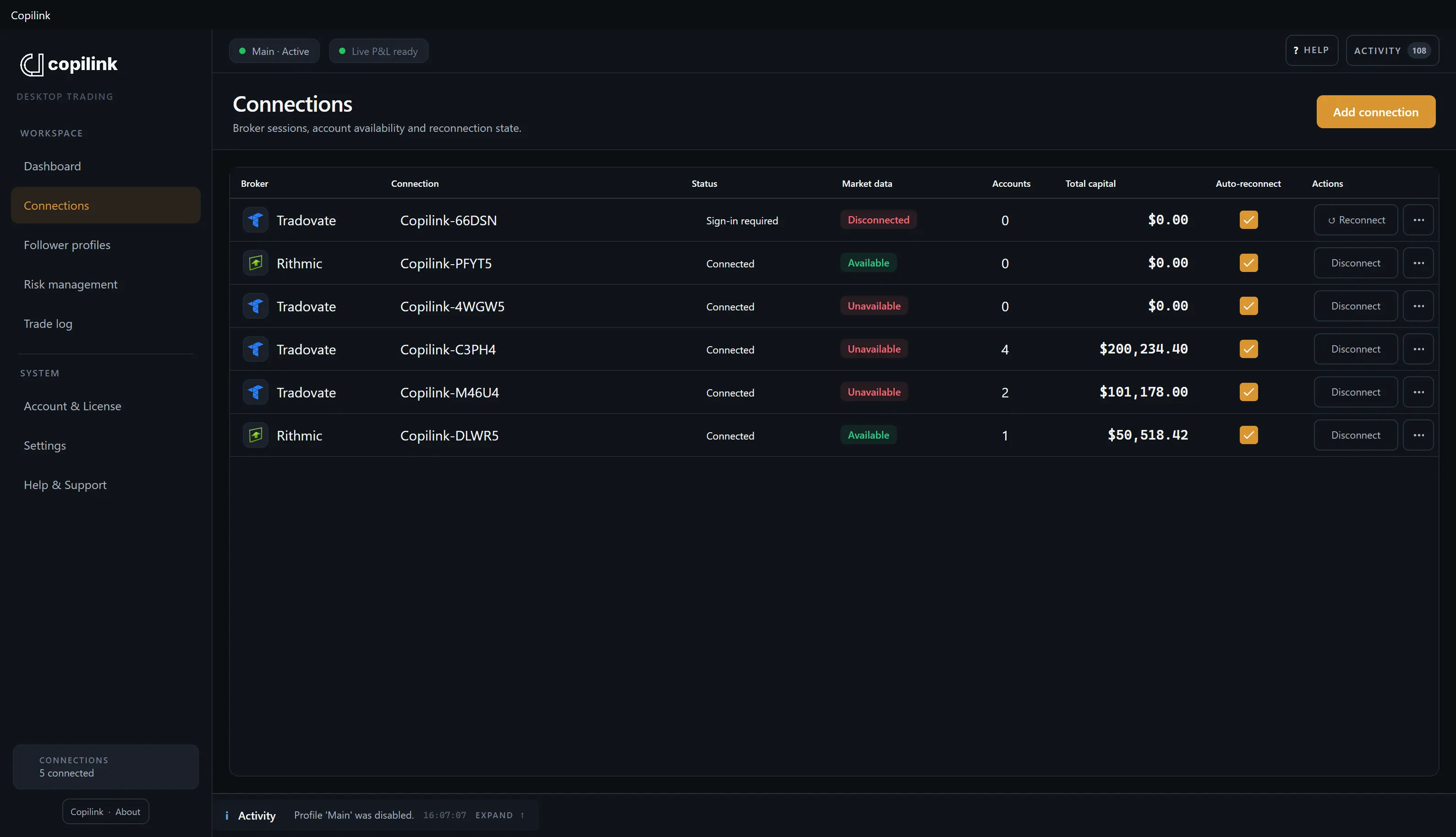
Connected to Tradovate directly.
You authorize Copilink in your browser, for Demo or Live, and return to the app. Copilink discovers the accounts that login can trade and keeps the authorization in your operating system's secure credential storage on that computer. Nothing is uploaded to a Copilink server to make copying work.
Demo and Live kept apart
Each environment has its own authorization and market-data entitlement, so a Demo login never touches Live accounts.
Auto-reconnect on start
Turn it on and Copilink attempts the saved link at startup. Expired authorization asks you to repeat the browser step.
Rithmic in the same profile
Add a Rithmic connection and put its accounts in the same follower list as your Tradovate ones.
Broker safeguards visible
Supported Tradovate accounts can show their broker-native safeguard status and editable limits when the account and API permissions allow it.
Size each follower. Protect each account.
A profile is one leader, the followers you enable, and an optional instrument list. Each follower gets its own sizing rule, and protection runs per account, so a 50k evaluation and a funded account can follow the same leader without sharing a limit.
Exact or ratio sizing
Copy the leader's whole-contract quantity, or scale each follower by its own ratio. Results are rounded down; anything below one contract is not sent.
Mini and micro cross mapping
Supported pairs such as NQ and MNQ can map across accounts while sizing still follows the exact or ratio rule.
Follower protection
A follower at the wrong size, open while the leader is flat, or in the opposite direction beyond your delay gets a flatten request and can be disengaged.
Prop firm risk rules
Per-account daily loss, daily profit, and evaluation goals can request a flatten on breach. A breached leader stops the profile. Trailing drawdown and funded consistency are monitored, not enforced, in the current app.
Working orders and fills
Working orders, changes, cancellations, partial fills, and fills are handled according to what each broker supports. Market orders copy from fill deltas so followers are not doubled.
Broker state wins
A flatten is a request to the broker, not proof an account is flat. Copilink shows the broker's position; confirm it there before resuming.
Built for how prop firm accounts are actually issued.
Most futures prop firms issue Tradovate accounts. Copilink connects to them directly; each firm still sets its own copying rules. Copying several Apex accounts? See the Apex trade copier.
Apex, Tradeify, Lucid, and others
These firms issue Tradovate accounts. A route is not copier permission, so check the program's rules.
Not Topstep or ProjectX accounts
TopstepX and other ProjectX platforms are not supported.
Evaluation and funded together
Give the evaluation account a tighter daily loss and its own goal while the funded account follows at full size.
Rules change; check the firm
Copier permissions and platform lists change without notice.
- Lucid TradingAllowed, with rules
- TradeifyOwn accounts
- MyFundedFuturesAllowed, with rules
- Apex Trader FundingAllowed, with rules
- Take Profit TraderTools restricted
- TradeDayAllowed, with rules
- FundedNext FuturesOwn accounts
- Elite Trader FundingTools restricted
- Top One FuturesAllowed, with rules
- BluSky TradingAllowed, with rules
- E8 FuturesOwn accounts
- Earn2TradeCopiers prohibited
Firm rules checked 27 September 2026. Confirm your account stage in the firm dashboard.
What it does not do
Copilink copies broker activity. It does not remove broker, market, or connection risk, and it is not a signal service.
No webhook or alert input
The leader is an account connected to Copilink, not an alert. Trades you place on it from TradingView are copied; TradingView alerts are not. There is no mobile app and no cross-computer copying.
Existing positions are not synchronized
Positions already open when a profile starts are not copied, and missed leader activity is not replayed later.
Followers can differ from the leader
Latency, liquidity, slippage, rejects, rate limits, and account restrictions can produce different positions and P&L.
The app has to be running
Copying and protection depend on Copilink and the broker connections staying up on your computer.
Tradovate rate-limits API requests, so a follower order can be rejected. Check the account at the broker after a reject.
Tradovate questions, answered plainly.
Account limits, Demo and Live, Rithmic followers, TradingView, and what happens when a follower rejects an order.
Can you copy trade on Tradovate?
Yes. Tradovate's own Group Trade places one order across a group of accounts under the same login. Copilink Standalone connects to Tradovate through its authorized API and copies a leader account to follower accounts you choose, with per-follower sizing, follower protection, and prop firm risk rules. It runs on your own computer and does not need NinjaTrader.
Does Tradovate have a built-in trade copier?
Tradovate has Group Trade, which places one order across a group of accounts under the same login, at the quantity you assign to each. It does not watch the accounts afterwards or track prop firm rules, and it cannot include accounts from another login or Rithmic.
How do you set up Group Trade in Tradovate?
Create a group, add accounts that sit under the same Tradovate login, and give each account a quantity. When you trade with the group selected, Tradovate sends the order to every account in it at its assigned size.
How many Tradovate accounts can Copilink copy to?
Every Standalone plan allows unlimited connected accounts, followers, and saved profiles. In practice the limit is set by your broker entitlements, connection quality, API limits, market-data availability, and the computer running Copilink, not by the plan.
Does it work with Tradovate Demo and Live?
Yes. Demo and Live are separate Tradovate environments with separate authorizations and market-data entitlements. You connect the environment that holds the accounts you intend to use, and a Demo authorization will not show Live accounts.
Can I copy from a Tradovate leader to Rithmic follower accounts?
Yes. One profile can route a leader across follower accounts from different saved connections and brokers, so a Tradovate leader can feed Rithmic followers and the other way round.
Does it copy trades from TradingView?
Yes, when TradingView is connected to your Tradovate leader account. An order you place on a TradingView chart goes to that account, and Copilink copies it to your followers like any other leader order. With stop loss sync on, follower stops are resized to match their positions when you scale in or out. Copilink is not a webhook receiver, so TradingView alerts and strategies that send webhooks are not an input.
What happens if a follower disconnects or rejects an order?
Every follower order is accepted, rejected, queued, or filled independently by its broker, so followers can differ from the leader. If a required leader or an enabled follower becomes unavailable, copying pauses rather than continuing silently. The activity log shows what happened on each account.
Do I need NinjaTrader 8?
No. Copilink Standalone is its own Windows and macOS application. Copilink for NinjaTrader 8 is a separate product with a separate license for traders whose accounts already run inside NinjaTrader.
Try it on your Tradovate Demo accounts first.
Start the 14-day Suite trial, connect Demo, build one profile with accounts flat, and place a single small test trade before you touch a live or funded account.
No card required
Copilink Standalone and Copilink for NinjaTrader 8 are separate products with separate licenses. This page describes Copilink Standalone. See the futures trade copier overview.