Trade copier troubleshooting: why followers miss trades or end up reversed
Trade copier troubleshooting starts at the broker: check what each follower holds, then match the symptom. The costliest problem, a reversed follower, often starts with an entry that never filled.
From Copilink, which makes trade copiers for running several futures prop firm accounts from one leader. See how it works →
Start every copy problem at the broker. Its platform or web portal shows what each follower really holds, and while a trade is live that is the only thing that matters. Then match what you see to the table below.
In Copilink's support history, the most common complaint is a trade that wasn't copied at all, and it's usually a setup problem such as a wrong contract month. The costliest is a follower that ends up reversed or left open. The most common cause we saw, and one any copier can hit, is a follower entry that never filled in a fast move.
Copilink Standalone stops that chain at the start: when a follower's copy of a limit entry stays unfilled for longer than its entry fill wait (10 seconds by default, set per profile), Copilink cancels it and skips that trade on the follower, so the leader's exit has nothing to reverse.
| What you see | Most likely cause | What to do |
|---|---|---|
| Nothing was copied | Follower switched off or locked, wrong contract month, symbol not in the profile's allowed instruments, size rounding to 0, or a broker restriction | Check the follower is on, then read the copier's activity log, which records why a follower was skipped |
| Leader filled, follower didn't | Price ran past the follower's limit entry, or the broker rejected the copy | Leave the follower flat for this trade; don't chase it by hand |
| Follower opposite the leader, or open while the leader is flat | The follower's entry never filled and the leader's exit then filled on it, a trade placed by hand on the follower, or NinjaTrader's Flatten Everything used while copying | Flatten that follower now, then find the cause |
| Follower at the wrong size | Ratio rounding or a partial fill | Check the follower's ratio, then its fills at the broker |
| Follower closed or switched off by itself | Follower protection, a Copilink risk limit, or the broker rejecting a copy for a loss limit, margin or liquidation | Check its position at the broker, then turn it back on |
| Stops or targets missing on a follower | On NinjaTrader 8: the follower's Market toggle or a wrong contract month | See why stop loss orders aren't copying |
The costliest problem: a follower that ends up reversed
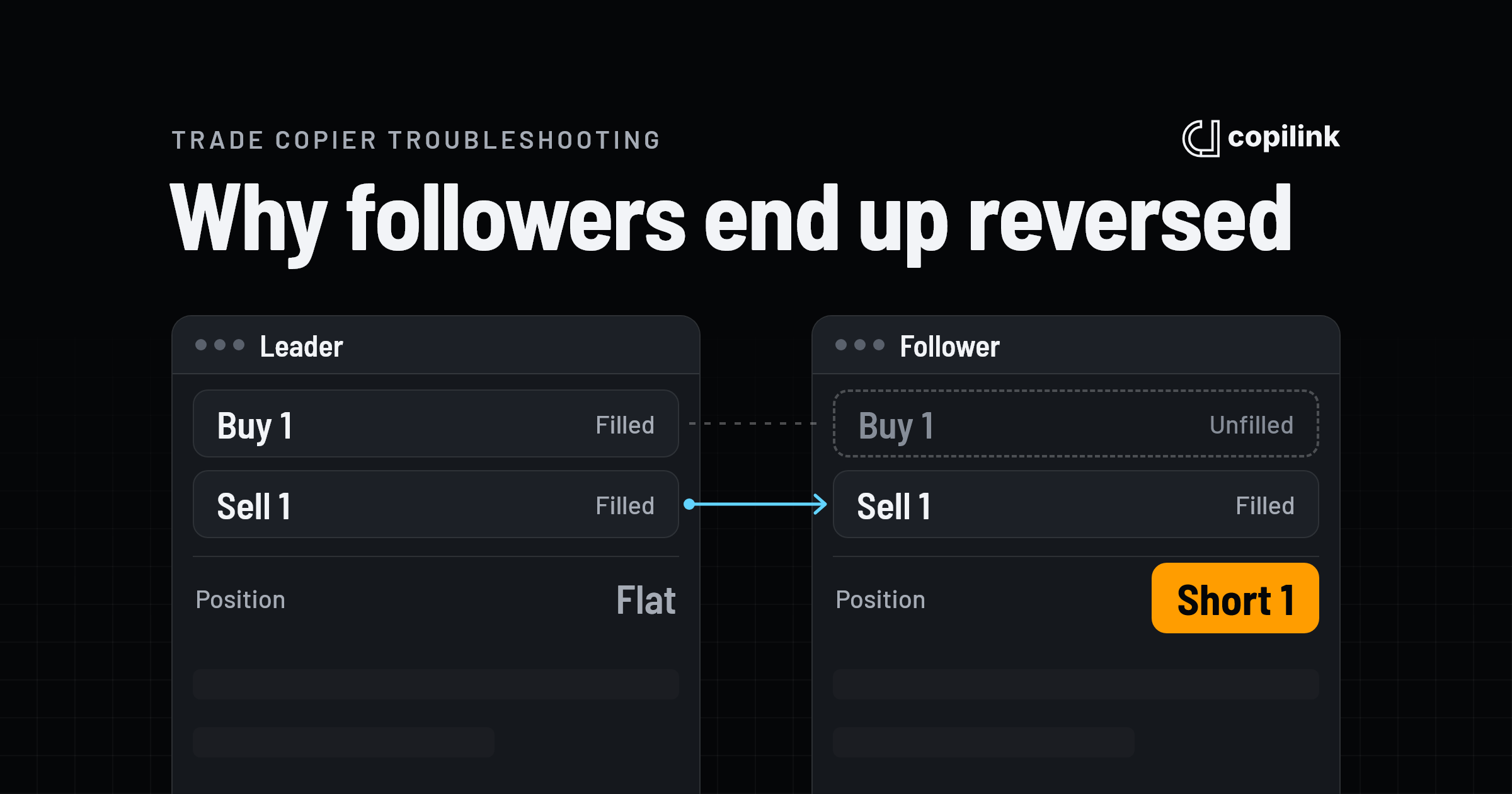
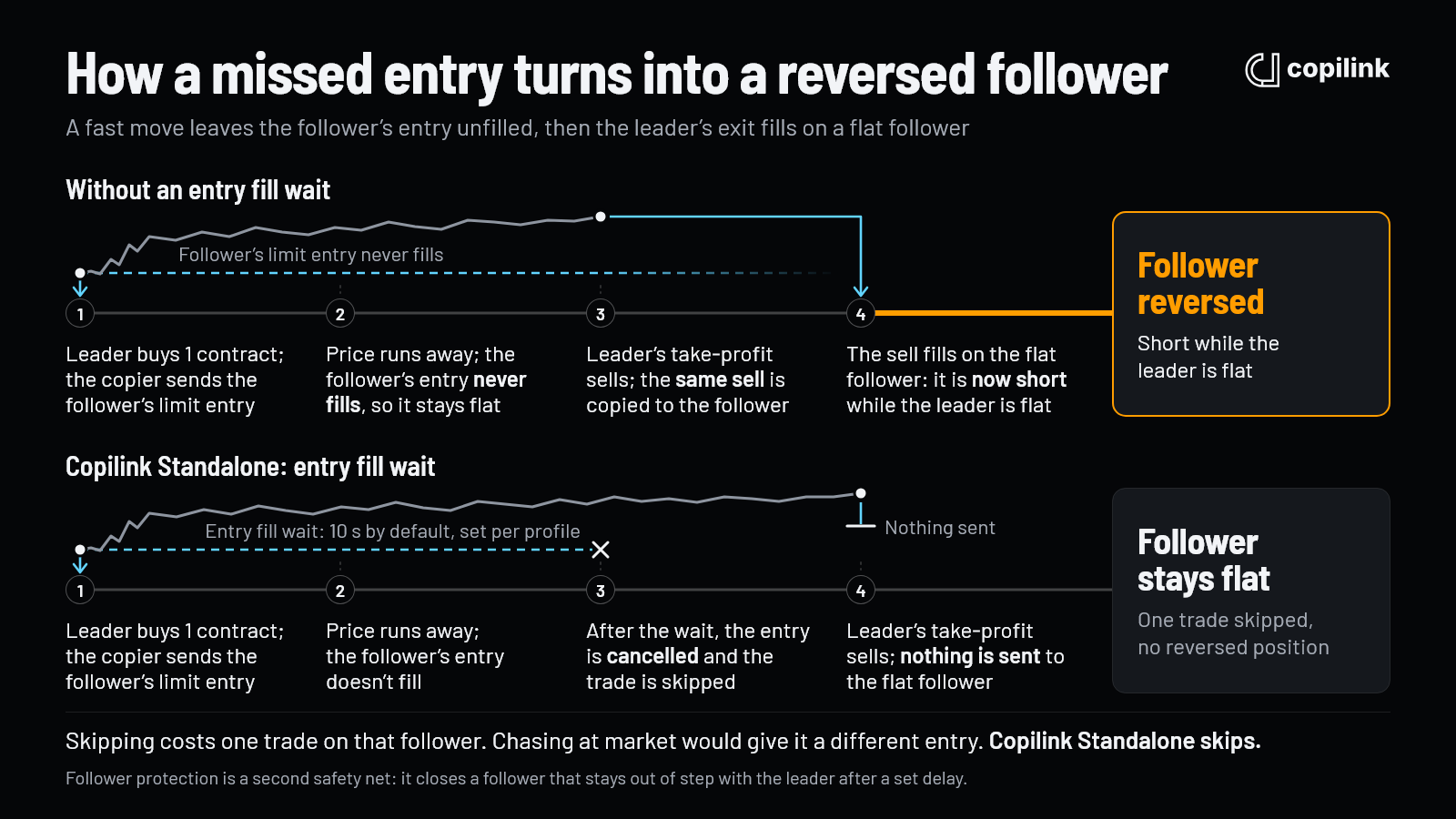
Here's how it happens. The leader's limit entry fills, price jumps away, and the follower's copy of that entry is left behind unfilled. The follower is flat. Then the leader's take-profit fills, the copier sends the same sell to the follower, and the sell fills on an account that never bought. The follower is now short while the leader is flat.
Speed doesn't prevent it. In one case from our support inbox, the copies reached Tradovate in about 25 ms, but NQ moved 10 ticks in under 2 seconds, so the followers' limit entries never filled. When the leader's take-profit filled, its copy opened positions on followers that had never entered, and follower protection closed them 10 seconds later. Any copier that sends the leader's exit to a follower without checking what the follower holds will do the same.
Copilink Standalone's entry fill wait exists for exactly this. After the wait, the follower's unfilled entry is cancelled and the trade is skipped on that follower. It was a tough decision, because each option has a drawback. Skipping means the follower misses that trade. Chasing it with a market order gives the follower a noticeably different entry. Standalone skips, and you can set the wait per profile.
Copilink for NinjaTrader 8 doesn't have an entry fill wait. On NinjaTrader, follower protection is the safety net for this case.
A follower holding the opposite side of the leader can also look like a hedge across accounts, which many prop firms prohibit, so check your firm's rules. See why reverse copying fails on prop accounts.
What traders contact support about
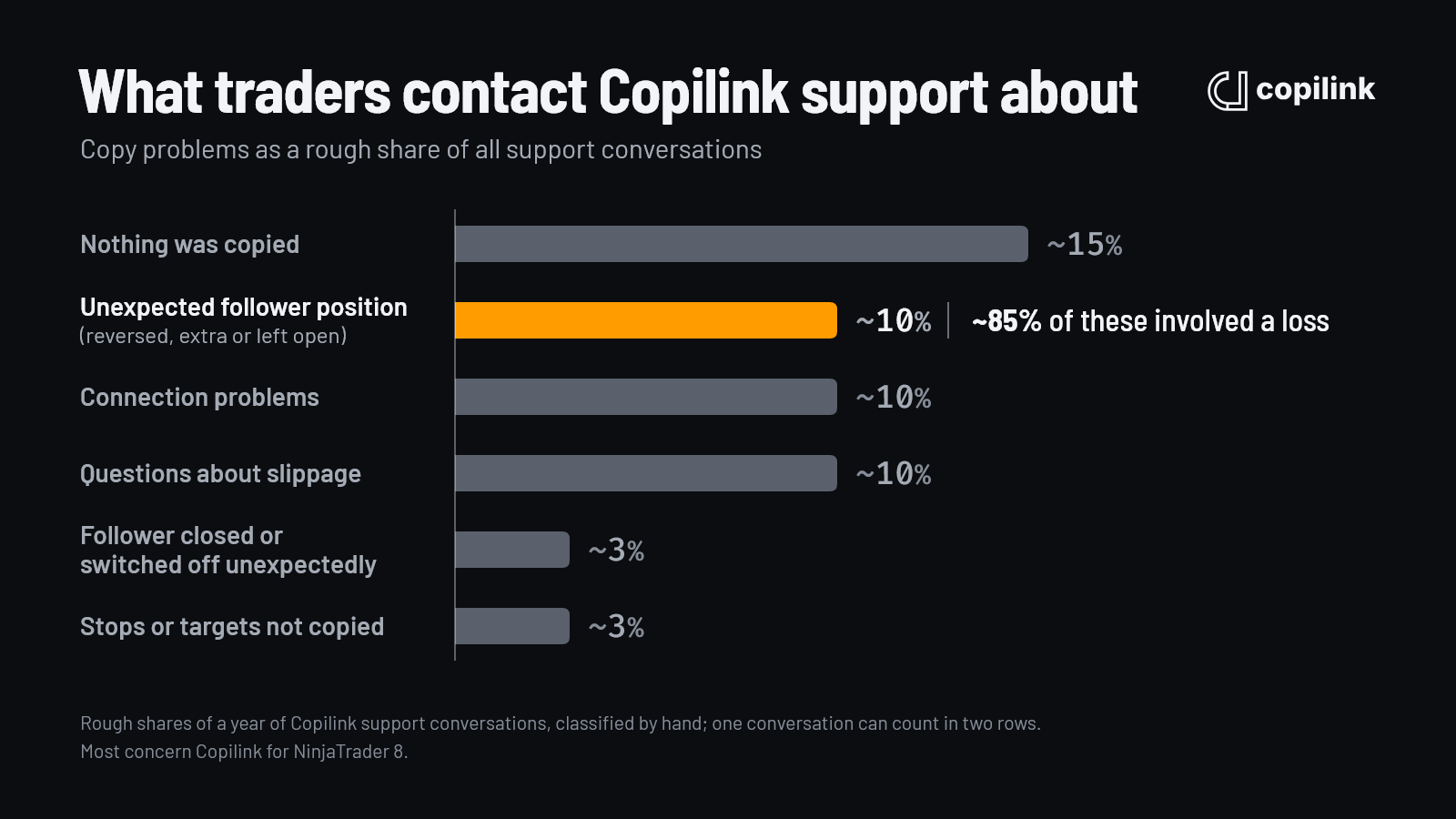
These are rough shares from a year of Copilink support conversations, sorted by hand:
- Nothing was copied: about 15%. Most confirmed causes were setup: a wrong or expired contract month above all, then a follower that was switched off, a leader that wasn't the account actually traded, or a broker restriction on the follower.
- Unexpected follower position (reversed, extra or left open): about 10%. Not the most common problem, but the costliest: about 85% of these conversations involved a loss.
- Connection problems: about 10%.
- Questions about slippage: about 10%. Most came down to market orders, or exits that wait for the leader's fill.
- A follower closed or switched off unexpectedly and stops or targets not copied: about 3% each.
Most of these conversations are about Copilink for NinjaTrader 8, the older add-on. The Rithmic problems people reported were all on NinjaTrader; Rithmic accounts on Copilink Standalone haven't had them.
Follower protection: the safety net
Follower protection watches each follower against the leader and closes it when the two disagree for longer than a delay you set, from 1 to 120 seconds. It only ever closes a position; it never opens one. Both checks are off until you turn them on.
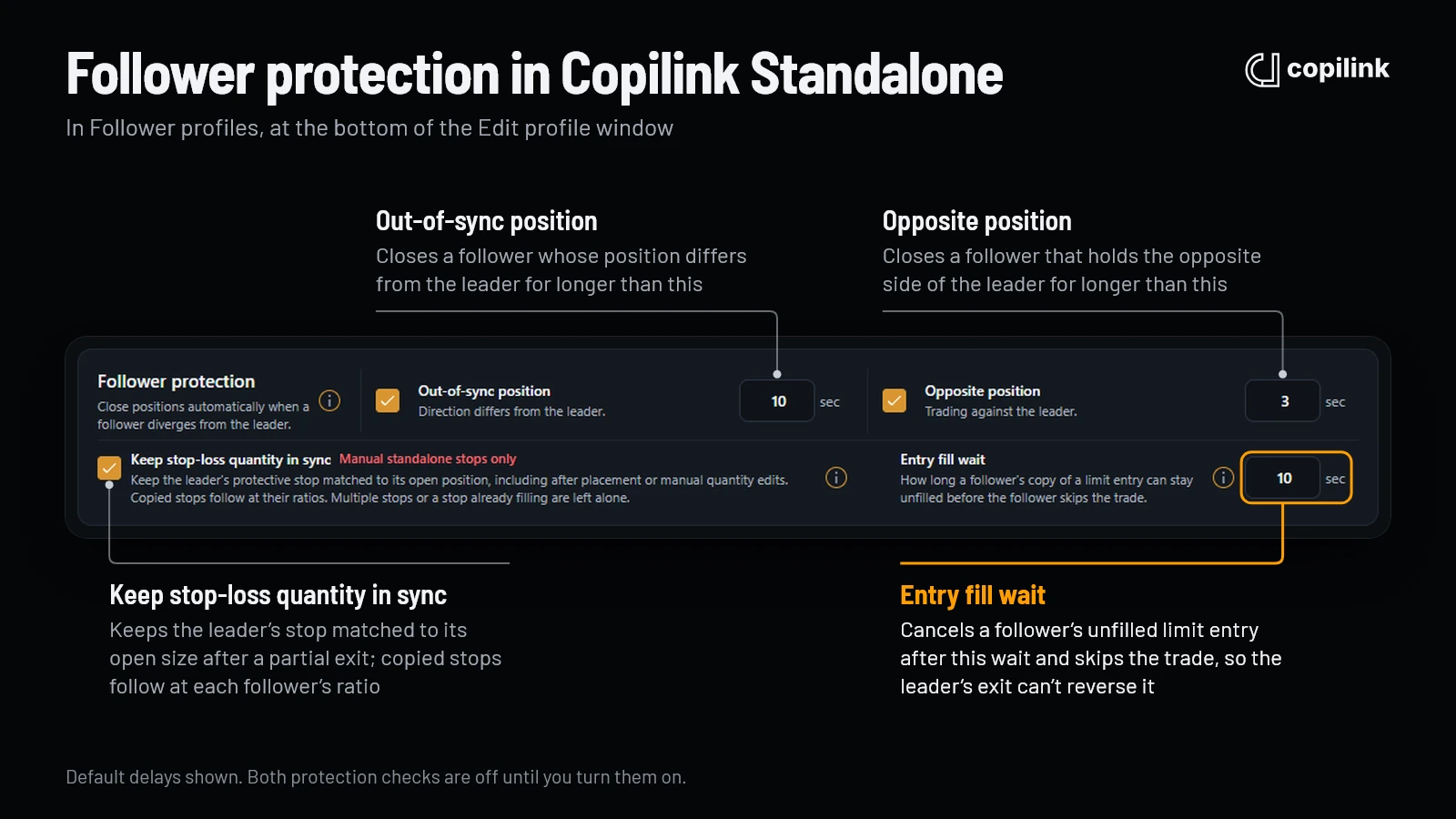
- Opposite position closes a follower that's short while the leader is long, or the other way round. The default delay is 3 seconds.
- Out-of-sync position closes a follower whose position differs from the leader's position times its ratio, in size or direction, including a follower still open after the leader is flat. A follower that's already flat is left alone. The default is 10 seconds.
- Disengage after protection takes a closed follower out of copying until you turn it back on.
- Protection works only when each account has one instrument and one contract month open. With more, it pauses for that account until it's back to one, and copying continues.
I run 3 seconds for opposite position and 8 seconds for out-of-sync. In my own trading it has never had to step in: Copilink Standalone very rarely goes out of sync. The full settings are in the follower protection guide.
When a follower is left open or reversed
If follower protection is on, Copilink closes it after the delay. If it's off, flatten that follower yourself at the broker or with Copilink's flatten control, then work out the cause.
Don't try to fix it by placing trades on the follower. I never enter a follower manually: it gets messy, and my strategy doesn't allow it. An order placed directly on a follower isn't copied anywhere, so it can push that follower further out of step with the leader.
When nothing was copied
Copilink Standalone skips a follower, and says why in Activity, when:
- its size rounds down to 0 at its ratio;
- the leader's symbol isn't in the profile's allowed instruments;
- it's switched off or disconnected;
- a risk limit has locked it;
- the broker has restricted it. On Tradovate, a restriction on a follower skips that follower, and a restriction on the leader pauses the whole profile.
On NinjaTrader 8, check that the follower's instrument uses the same contract month as the leader's chart, and that the leader in Copilink is the account you're actually trading. The NinjaTrader 8 answer walks through the rest, and the Standalone troubleshooting guide covers each status.
After a crash or disconnect
- A follower drops (Copilink Standalone): copying to that follower stops and continues to the others.
- The leader drops (Copilink Standalone): the profile stops and shows Issue, then starts again by itself when the accounts are back.
- Copilink closes or crashes (either product): positions and working orders stay open at the broker, and nothing is copied until it's running again.
- Missed trades aren't replayed. Leader trades made during the gap don't reach a follower when it comes back, so check every follower at the broker and bring it back in line before the leader trades again.
- No double orders (Copilink Standalone). If the broker doesn't answer a copied order, Copilink doesn't send it again, because the first one may have worked. It reports the uncertain result in Activity instead.
I always trade with a stop loss, and Copilink copies it to every follower, so the stops sit at the broker on every account even if my PC goes offline.
A one-minute check before the session
Before I trade, I place a limit order on the leader well away from the market and check that the copy appears on every follower. It's my routine to see everything works. Then I cancel it, and the copies are cancelled too.
After the session, check that every follower is flat at the broker, not just in the copier.
NinjaTrader 8 traps
- Flatten Everything in NinjaTrader while followers are enabled can copy the leader's flatten and create reverse trades on the followers. Turn the followers off in Copilink first, flatten, confirm every account is flat, then turn them back on. See why Flatten All doesn't work.
- NinjaTrader 8.1.7 or newer is required.
- One Rithmic connection per NinjaTrader: accounts at a second firm need their own login. See how to connect multiple Rithmic accounts.
- Contract months: an instrument left on an expired month is the most common reason nothing copies.
FAQ
Why did my copier enter on the leader but not the follower?
Usually price moved past the follower's limit entry before it filled, or the broker rejected the copy. Leave the follower flat for that trade. Copilink Standalone cancels an unfilled follower entry after its entry fill wait so the leader's exit can't reverse it.
Why is my follower short when the leader is flat?
The follower's entry never filled, then the leader's exit copy filled on the flat follower. Flatten the follower. On Copilink Standalone, the entry fill wait cancels the unfilled entry, and follower protection, if you've turned it on, closes the follower after its delay.
Should I enter a missed trade on the follower by hand?
No. A trade placed directly on a follower isn't copied anywhere and can put the follower further out of step with the leader. Missing one trade on one follower costs less.
What happens to copied positions if the copier crashes?
They stay open at the broker, with their stops and targets, and nothing new is copied until the copier is back. Leader trades made in the meantime aren't replayed, so check each follower at the broker before you trade again.
Continue this topic
See Rithmic trade copier options →Trade without NinjaTrader
Copilink Standalone is a futures trade copier for Tradovate and Rithmic on Windows and macOS. The trial lasts 14 days and does not require a card.
Already use NinjaTrader 8?
The Copilink NinjaTrader 8 trade copier runs inside NinjaTrader 8 on Windows and includes a separate 7-day trial.