
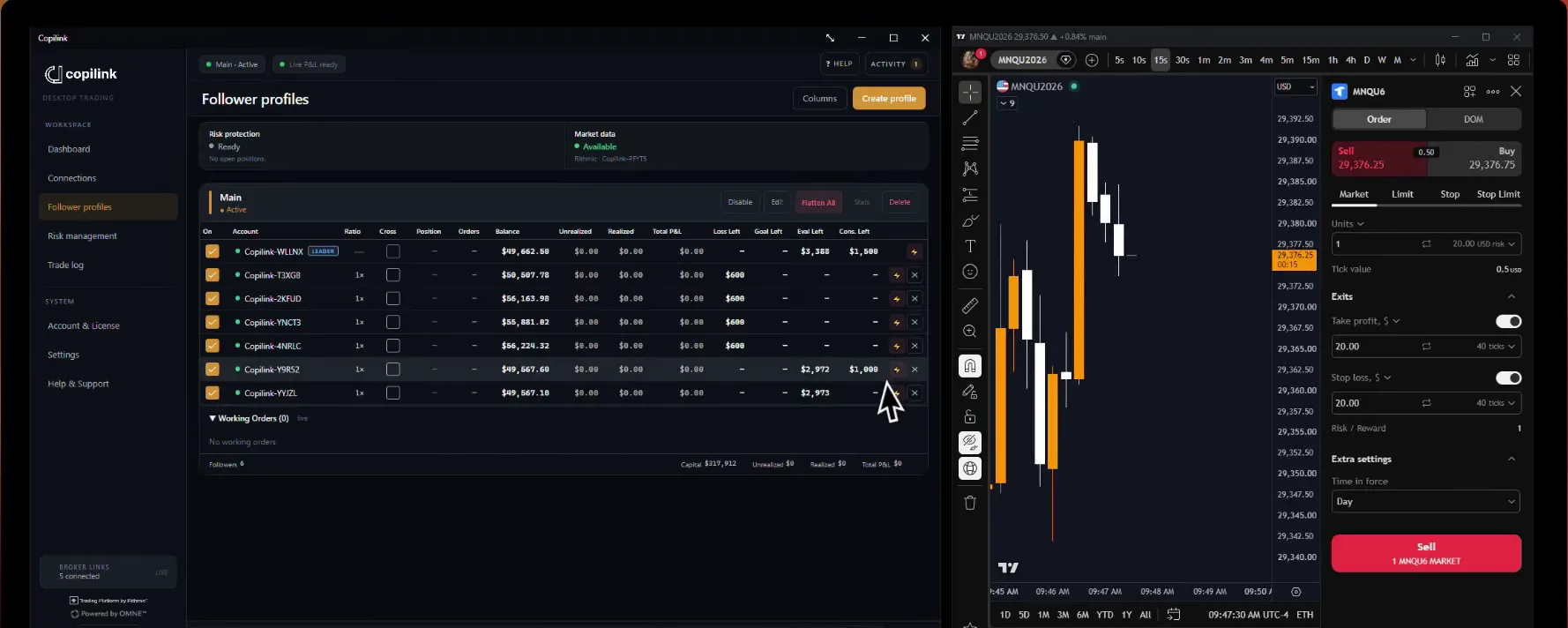
Prop firm risk management for NinjaTrader 8.
Copilink for NinjaTrader 8 puts prop firm risk management inside NinjaTrader 8, beside the trade copier: daily loss and profit limits, the account goal, consistency caps and session lockout for each account, with auto-flatten when a limit is reached.
7 days free · No card · Windows and NinjaTrader 8
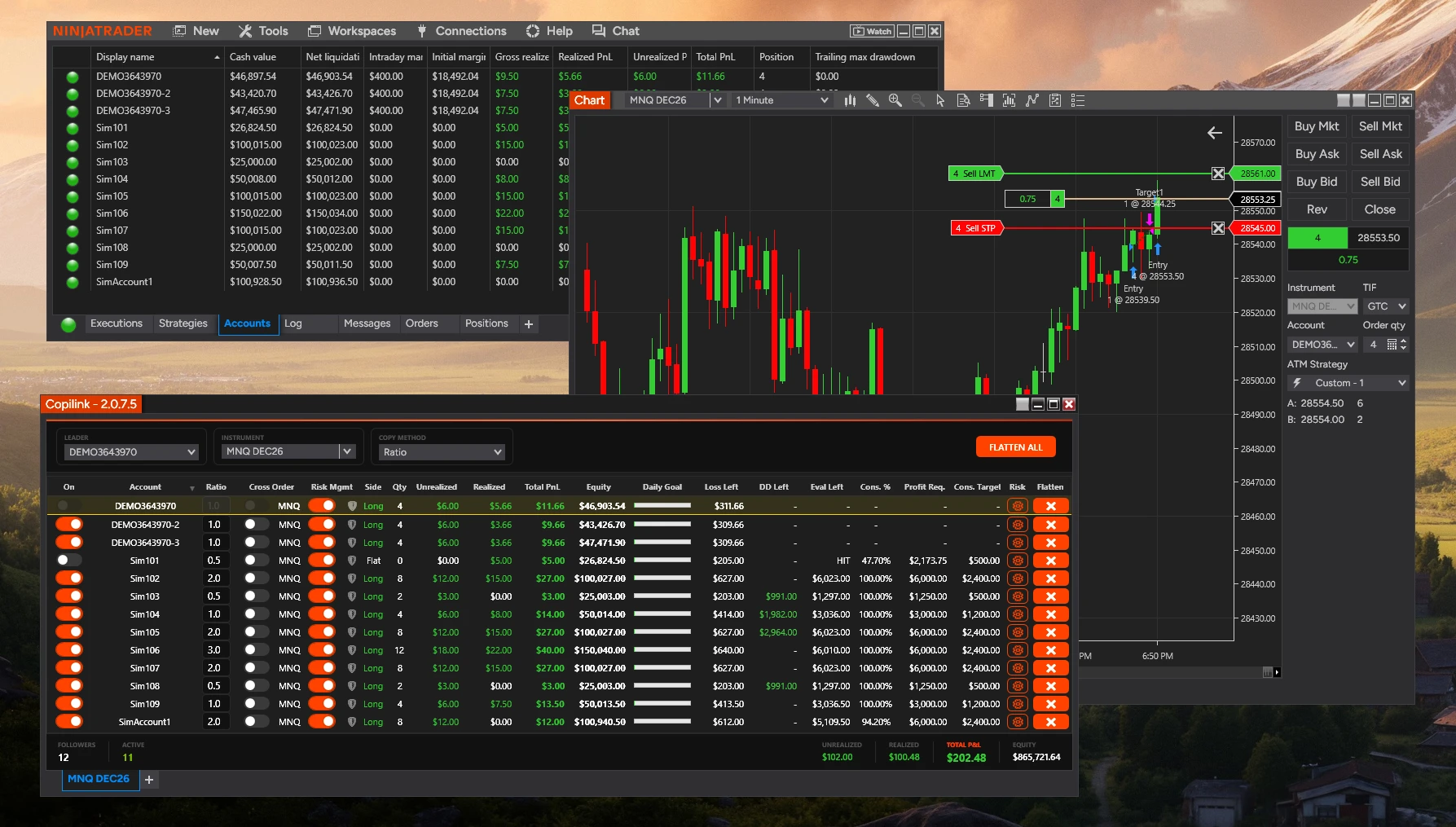
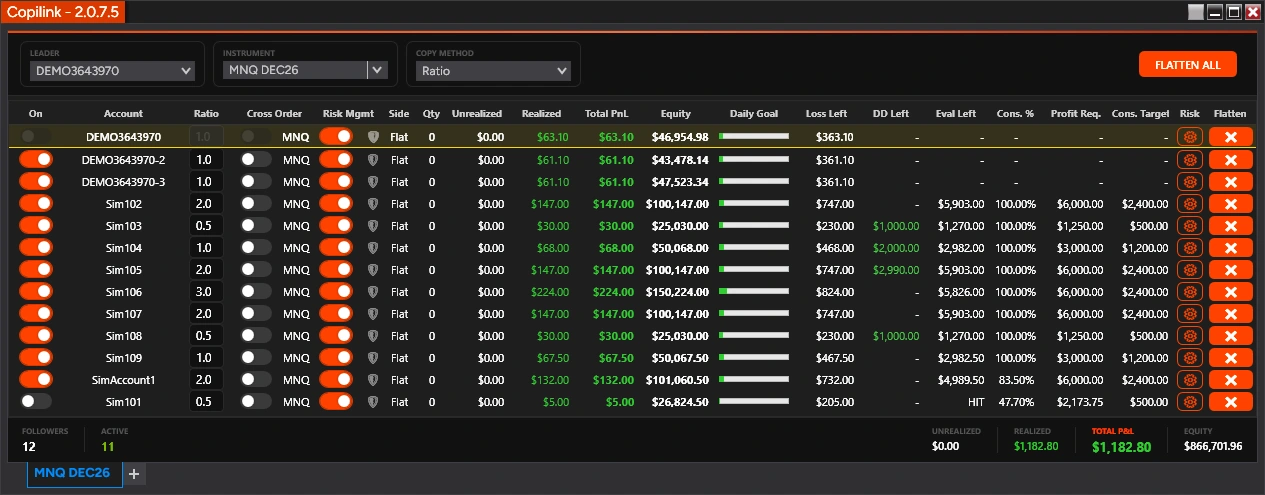
In the copier's grid
A switch per account.Turn Risk Mgmt on for each account that should be watched. Saved rules do nothing while it is off.
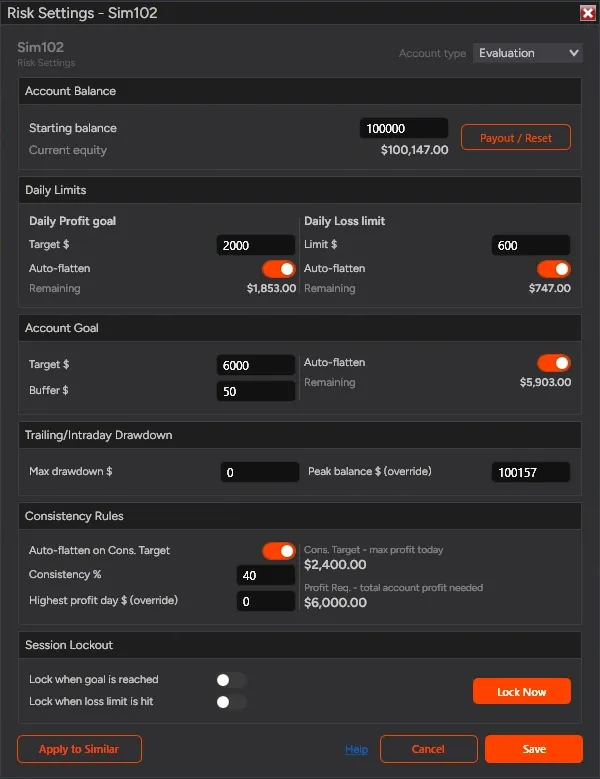
One window per account.The risk cog opens the account's limits. They apply on every Copilink tab.
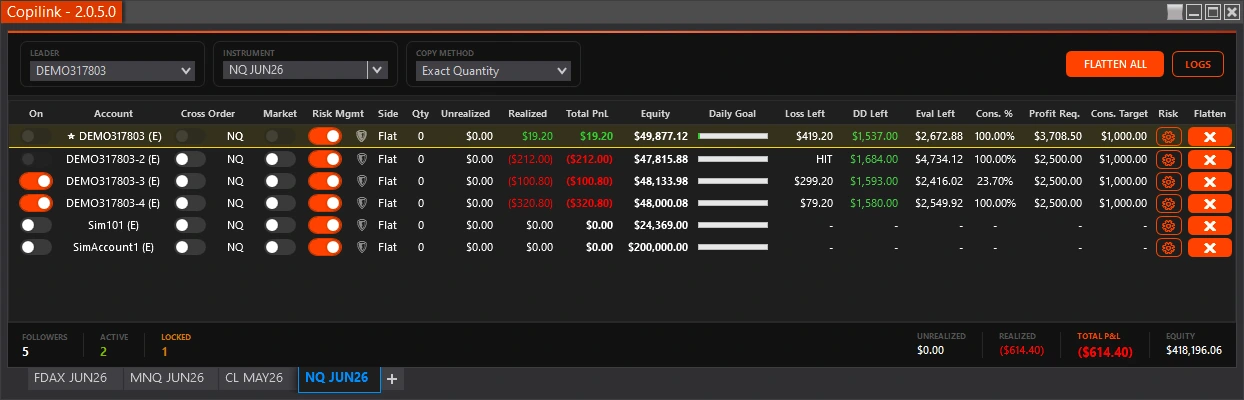
Risk columns in the grid.What is left before each limit, beside the account it belongs to.
- Updates in a row before a rule acts
- 2
- A one-tick spike in the reported P&L does not flatten an account.
- Session reset
- 5 PMCT
- A locked account stays locked until then, then can be switched back on.
- Free trial, no card
- 7days
- Copilink Risk: the copier and the risk rules, on your own accounts.
What traders say after copying with Copilink.
Reviews from Copilink customers, shown exactly as they wrote them.
- 5 out of 5 stars
I really like the risk management with copilink, because it protects my follower accounts in case of a rogue trade, which I greatly appreciate and it gives me a lot more peace of mine in trading.
- 5 out of 5 stars
Trades quickly, easy to use
- 5 out of 5 stars
Best copier out there , faster and reliable. Been using on multiple props firm account and works smoothly! Customer service has reach me fast on any demand , i believe copilink will leader soon.
- 5 out of 5 stars
fills all of my account order instantly
- 5 out of 5 stars
Lightning fast
Excellent trade copier and it’s only gotten better since they now added risk management!
- 5 out of 5 stars
Great product!
- 5 out of 5 stars
Reliable trade copier
Pretty good definitely more reliable than than the others
- 5 out of 5 stars
Copiador estable
- 5 out of 5 stars
Fast and reliable and suprisingly affordable
- 5 out of 5 stars
It is best copier. I have ever used. I am using it with ninjatrader 8. It has best compatibility with it.
- 5 out of 5 stars
works great lots of good features to help manage my trades
- 5 out of 5 stars
Reputable seller, also gives out trial periods and solid support
- 5 out of 5 stars
Great at all! best out there!
- 5 out of 5 stars
new user, and new to the "trade copy" scene. Still learning the ropes. Like it so far.
- 5 out of 5 stars
EVERYTHING GREAT
What does each risk rule watch, and what does it do? Four flatten at your number. Drawdown is tracked.
Flatten and lockout are two different things.
Flatten
Closes the account's open positions and switches the account off. It cannot be switched back on while the limit is still reached.
Lockout
Keeps the account off for the rest of the session, even after NinjaTrader restarts. Lock Now does not close anything by itself.
Daily goal and daily loss can do both: flatten, then lock the account until the next session. Account goal and consistency flatten. Trailing drawdown is tracked only.
Daily profit goal
Auto-flatten- Watches
- NinjaTrader's Total PnL for the session
- You set
- Target $ and auto-flatten
- At the goal
- The account is flattened, and can be locked for the rest of the session
- In the grid
- Daily Goal shows the progress
Daily loss limit
Auto-flatten- Watches
- NinjaTrader's Total PnL for the session
- You set
- Limit $ as a positive number, and auto-flatten
- At the limit
- The account is flattened, and can be locked for the rest of the session
- In the grid
- Loss Left shows the room that remains
Account goal
Auto-flatten- Watches
- Total account profit from your Starting Balance
- You set
- Target $, Buffer $ and auto-flatten
- At goal plus buffer
- The account is flattened
- In the grid
- Eval Left shows what is still needed
Trailing or intraday drawdown
Tracked only- Watches
- Current equity against the account's peak balance
- You set
- Max drawdown $, and the peak balance if it was set earlier
- DD Left
- Max drawdown − (peak balance − current equity)
- What it does not do
- It never flattens the account, and it is not end-of-day drawdown
Consistency rule
Auto-flatten- Watches
- Today's profit against the Cons. Target
- You set
- Consistency %, auto-flatten, your highest profit day if it predates Copilink, and Activation $ on funded accounts
- At the Cons. Target
- The account is flattened
- In the grid
- Cons. %, Cons. Target and Profit Req.
Session lockout
Lockout- Locks when
- The daily goal is reached, the daily loss limit is hit, or you press Lock Now
- While locked
- Nothing is copied to the account, and it cannot be switched back on
- Clears
- At the session reset, about 5 PM CT (6 PM Eastern)
- Not the same as a flatten
- A flatten closes positions; lockout keeps the account off until the reset
Apply to similar accounts
Bulk setup- Finds
- Saved accounts whose names start with the same prefix
- You choose
- Which accounts receive the settings
- And which rule groups
- Daily Profit Goal & Loss Limit, Evaluation Target & Buffer, Consistency Rules, Trailing Drawdown, Auto-Lockout Settings
- Every account
- Still keeps its own risk settings, in every Copilink tab
A flatten is a request NinjaTrader sends to your broker, so it is not an instant or guaranteed fill. Leave a buffer inside the firm's own limit, and confirm the position at the broker before you resume. After a real payout or an account reset, use Payout / Reset to rebase the tracking to current equity.
Set your limits before your next session.7 days free · No card · Copilink Risk: copier and risk rules
Start the 7-day NT8 trialWhat if the leader hits a limit? Its flatten is copied. Lead with the most room.
How to arrange the accounts
3Lead with the account furthest from its limits.Then a follower reaches its own rule first and is closed alone.
A follower's rule touches only that follower.The leader and the other followers keep trading.
Every account keeps its own numbers.An evaluation and a funded account can follow the same leader under different limits.
Can one bad tick flatten an account? No. A breach must show twice in a row.
Built for an empty desk
VPS Mode, for an unattended computer.With VPS Mode on, an account that hits a rule is switched off until the next trading day and switched back on then, so nothing re-enters while you are away.
Rithmic reports P&L more slowly.Rules act on what NinjaTrader reports, and Rithmic updates arrive later than Tradovate's. Set the limit with a buffer.
NinjaTrader has to be running.The rules are checked while Copilink is open in NinjaTrader 8, on your computer or a Windows VPS.
Place one micro contract trade and watch the rules work.7 days free · No card · Copilink Risk: copier and risk rules
Start the 7-day NT8 trialHow do you see where every account stands? A column per rule, and protection for followers.
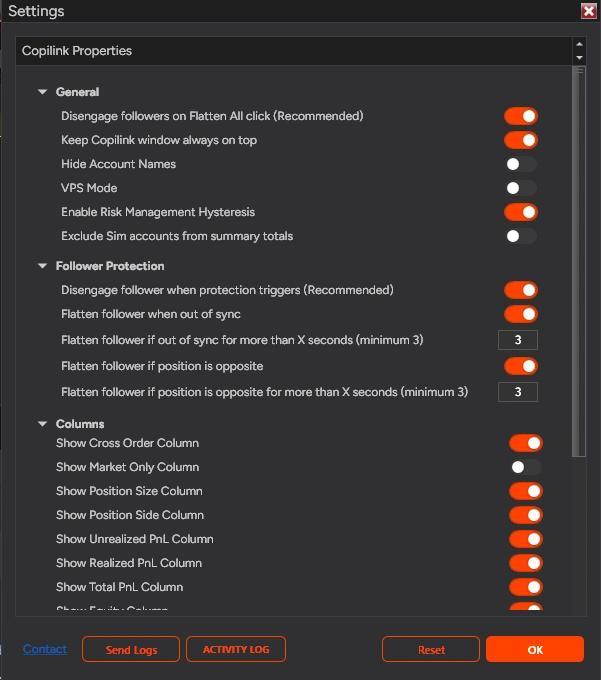
Follower protection, with every licence
Separate from the account rules and set from the right-click Settings menu. It watches for a follower that is out of sync with the leader, or on the opposite side, and flattens it after your delay.
How do you set it up? Four steps per account, then copy to the rest.
Choose the account type
Evaluation, Funded or Live. It decides how the goal and consistency are worked out.
Enter the numbers
Starting Balance, Account Goal, daily limits, consistency % and any buffers you need.
Save, then switch Risk Mgmt on
Click Save in the risk window, then enable Risk Mgmt for the account in the follower grid.
Place one micro contract trade
Open the Activity Log from Settings and check the columns before you rely on the rules.
What it does not do
4No guaranteed instant flatten.NinjaTrader and broker data timing still matter.
No End-of-Day drawdown tracking.
No separate drawdown auto-flatten rule.Drawdown room is shown, not enforced.
No cross-computer risk control.Unless all accounts run in the same NinjaTrader or VPS session.
Which licence includes it? Copilink Risk, by the month or once.
| Included | Copilink Basic$226.88 once | Copilink Risk$37.88 a month or $397.88 onceOur pick |
|---|---|---|
| Copying | ||
| Unlimited follower accounts | Included | Included |
| Exact Quantity and Ratio sizing | Included | Included |
| Cross Order for minis and micros | Included | Included |
| Market Only, per follower | Included | Included |
| Follower protection | Included | Included |
| Flatten All, and Flatten per follower | Included | Included |
| Saved settings | Included | Included |
| Risk rules, per account | ||
| Daily profit goal and daily loss limit | Not included | Included |
| Account goal with a buffer | Not included | Included |
| Consistency rule | Not included | Included |
| Trailing or intraday drawdown tracking | Not included | Included |
| Session lockout | Not included | Included |
| Apply to similar accounts | Not included | Included |
Protect the accounts you copy to.
Set account-specific limits, then leave enough buffer for real broker, platform and execution timing.
Copilink Standalone
Not trading inside NinjaTrader?
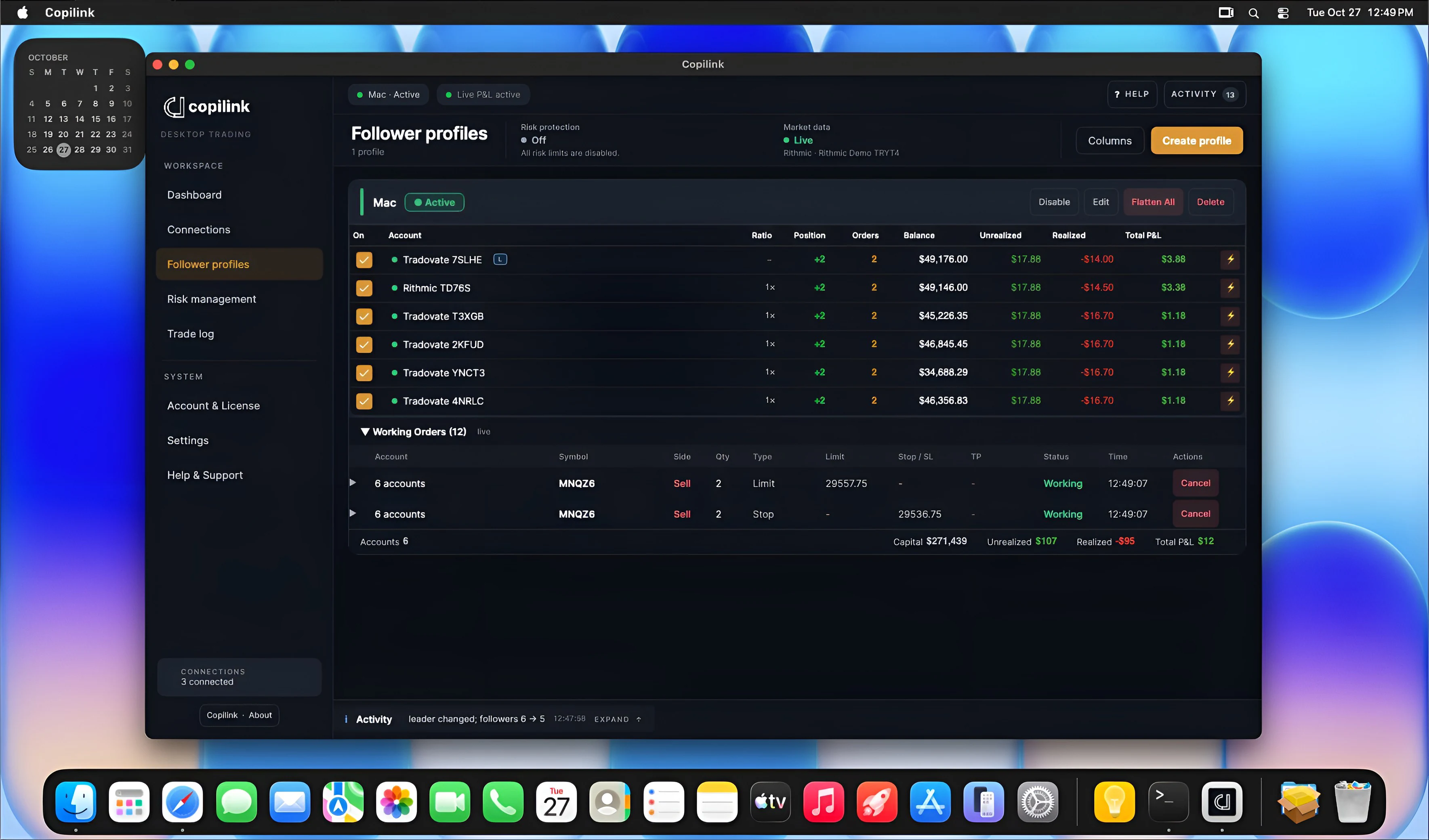
Copilink Standalone is the full trading suite for Windows and Mac. It connects straight to Tradovate and Rithmic, with no NinjaTrader, and has its own account risk rules and follower protection beside the copier. It is a separate app and subscription.
Trade copierOne leader to any number of followers, across Tradovate and Rithmic logins.
Account protection and risk rulesFollower protection and per-account limits, in every plan.
Trade journalEvery copied trade synced to the web; the full journal is in the Suite plan.
AnalyticsDesktop analytics in every plan, advanced web analytics in Suite, to find your edge.
Trade one NinjaTrader account.
Copilink the rest.
Start the trial
Seven days of Copilink Risk, the copier plus account rules. No card.
Install and activate
Install Copilink in NinjaTrader 8 on Windows and activate your licence.
Pick accounts and copy
Choose your leader and follower accounts, then place one micro contract trade to watch it copy.
- 7 days free
- No card