
How to use Copilink in NinjaTrader 8
To use Copilink in NinjaTrader 8, connect your accounts, open Copilink from Control Center → New → Copilink, choose a leader and an instrument, and switch on the followers that should copy. Below is what every control in Copilink's NinjaTrader 8 add-on does.
Install and open.
Download Copilink.zip from your dashboard, import it with Tools → Import → NinjaScript Add-On... and restart NinjaTrader. Open it from Control Center → New → Copilink. The setup page has every step, including connecting accounts.
You need
3Windows PC or Windows VPS
NinjaTrader 8 desktop 8.1.7.x or newerLicensing needs it.
Every account in the same NinjaTrader sessionCopilink does not copy between computers; for a remote setup, connect all accounts in one NinjaTrader on a Windows VPS.
Licence
Leader, instrument and tabs.
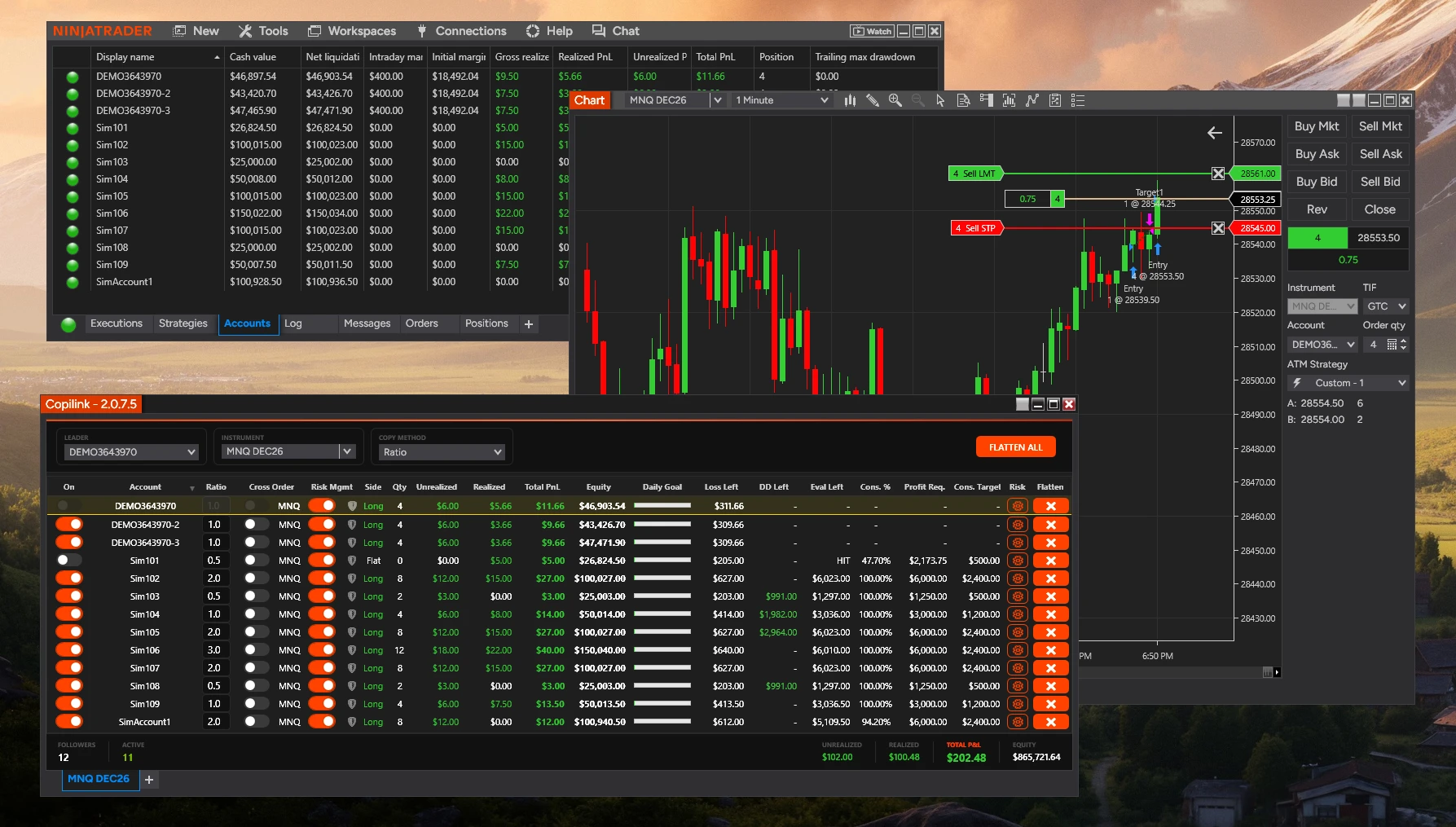
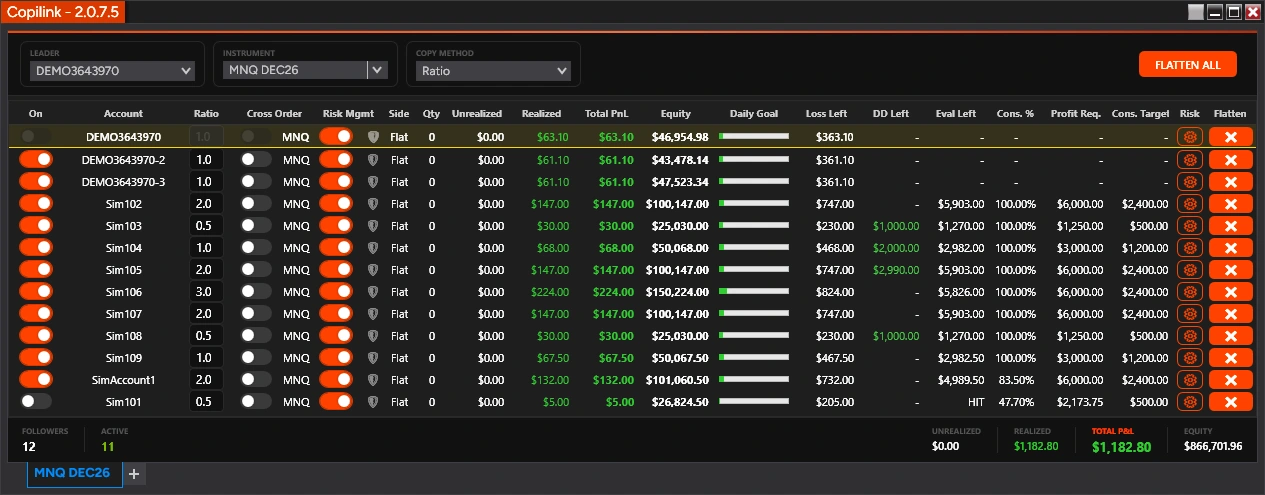
The leader is the account you trade from.It is the top row of the grid, underlined in yellow, and its On switch is greyed out. If the LEADER box ever shows a different account, the top row with the yellow underline is the one Copilink uses.
One tab per instrument.Each tab copies one contract. Trading ES and NQ takes two tabs; add one with the + next to the tabs.
A tab is named after its instrument.It cannot be renamed. Change the instrument to change the name.
Copilink keeps its own tabs.They are saved separately from your NinjaTrader workspace. Only one Copilink window can be open at a time.
The bar at the top of each tab
Copy methods, Cross Order and Market.
COPY METHOD
| Setting | Follower size | Example |
|---|---|---|
| Exact Quantity | Same as the leader | 3 → 3 |
| Ratio | Leader × Ratio, rounded down | 2 × 0.5 → 1; under 1 sends nothing |
Cross Order trades the paired contract on that follower: ES↔MES, NQ↔MNQ, YM↔MYM, RTY↔M2K, GC↔MGC, CL↔MCL, BTC↔MBT, ETH↔MET and other supported pairs, with the same expiry. Because the two contracts are priced differently, a copied limit order may not fill, and Ratio may round below one contract.
Market off copies working orders: entries, stops, targets and limits are placed on followers as on the leader. Market on waits for fills on the leader and sends market orders, so nothing is placed on followers in advance and fills can slip. The Market column is hidden until you turn on Show Market Only Column in Settings.
Note
Follower grid column reference.
Copier and P&L columns
| Column | Shows |
|---|---|
| On | Copying on for this follower. Greyed out on the leader. |
| Account | The NinjaTrader account. |
| Ratio | Size multiplier, used with the Ratio method. |
| Cross Order | Trade the paired mini or micro on this row. |
| Market | Copy fills as market orders. Hidden by default. |
| Risk Mgmt | Risk rules on for this account (Copilink Risk). |
| Side, Qty | The position NinjaTrader reports. |
| Unrealized | Open-position P&L NinjaTrader reports. |
| Realized | Closed P&L for the session. |
| Total PnL | Realized plus unrealized. |
| Equity | Net liquidation value. |
| Flatten | Closes this follower and switches it off. |
The bar under the grid adds up the followers: how many there are, how many are active or locked, and their P&L and equity. If it shows $0.00, check that the accounts are connected. Settings can hide any column; that changes the display only.
Copilink Risk columns
| Column | Shows |
|---|---|
| Daily Goal | Progress to the daily profit goal. |
| Loss Left | Room left before the daily loss limit. |
| DD Left | Room left to the drawdown you set. Tracked only. |
| Eval Left | Profit left to the Account Goal plus Buffer. |
| Cons. % | Best day as a share of total profit. |
| Profit Req. | Total profit your best day needs. |
| Cons. Target | Most you can make today within the rule. |
| Risk | Opens the account's Risk Settings. |
Note
Flatten safely.
FLATTEN ALL closes the tab's instrument.It switches the followers off, closes them, then closes the leader. The followers stay off until you switch them on. If you turn off Disengage followers on Flatten All click in Settings, they switch back on by themselves 3 seconds later.
A row's Flatten button closes one follower.It cancels the working orders of that follower, closes its position and switches it off.
Warning
Settings and logs.
Right-click anywhere in the Copilink window for Settings, Daily Stats Image, Flatten All, Disable Risk for All and Help / About.
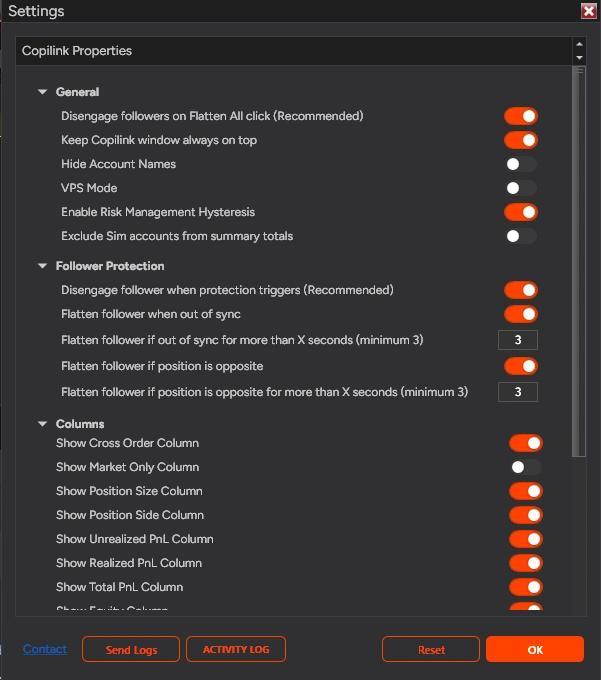
Settings
| Setting | Default |
|---|---|
| Disengage followers on Flatten All click (Recommended) | On |
| Keep Copilink window always on top | Off |
| Hide Account Names | Off |
| VPS Mode (Copilink Risk) | Off |
| Enable Risk Management Hysteresis (Copilink Risk) | On |
| Exclude Sim accounts from summary totals | Off |
| Disengage follower when protection triggers (Recommended) | On |
| Flatten follower when out of sync | Off, 8 s |
| Flatten follower if position is opposite | On, 3 s |
- Follower Protection flattens a follower whose position stays out of sync with the leader, or opposite to it, for longer than the seconds you set (3 to 100). The risk guide explains it.
- ACTIVITY LOG, at the bottom of Settings, shows or hides the log under the grid of this tab. It records what Copilink sent and why.
- Send Logs sends your logs to support. Say when it happened, the instrument, the leader and follower, and what you expected.
- Daily Stats Image makes a picture of the results on this tab. You can mask account names, hide flat or negative accounts, save it to a file or copy it.
- Disable Risk for All switches Risk Mgmt off for every account on the tab and hides the risk columns; it then reads Enable Risk for All. Saved risk settings are kept.
Risk management quick setup.
Copilink Risk adds rules per account: daily goal and daily loss, account goal with buffer, consistency, session lockout, VPS Mode and Risk Management Hysteresis. Open an account's rules with the gear in its Risk column, set them, press Save, and switch on its Risk Mgmt. Rules do nothing while Risk Mgmt is off.
Warning
Basic troubleshooting.
Problem and fix
6- Trades are not copying.
- Check the instrument's expiry, the leader, and the follower's On switch.
- Stops or targets are not copying.
- Market is on for that follower. Turn it off to copy working orders.
- Copilink says it is already open.
- Go to the workspace where it is open, close it there, then open it in this one.
- Licence required or expired.
- Check that NinjaTrader is 8.1.7.x or newer and that your NinjaTrader account email is the one on your Copilink licence, then restart NinjaTrader.
- Cross Order misses fills.
- The mini and micro are priced differently, so the copied order may not fill, or Ratio rounds below one contract.
- Risk rules do not fire or keep resetting.
- See risk troubleshooting.
What it does not do.
Not supported
7Webhooks or webhook URLs
Copying from a phone app
Mirror or inverse copying
Stealth or randomized execution
End-of-Day drawdown tracking
Fractional contracts
More than one active Rithmic connection in NinjaTrader
Still stuck?
The FAQ answers the common questions, and support is one message away.
Not a customer yet? Try Copilink Risk free.7 days free · No card · Copilink Risk: copier and risk rules
Start the 7-day NT8 trial